আপনার কোচিং আসলে যে স্ক্রিনগুলোতে চলে
ফি, পরীক্ষা, হাজিরা, ভিডিও, অভিভাবক। আজ এগুলো থাকে একটা এক্সেল শিটে, একটা হোয়াটসঅ্যাপ গ্রুপে আর টেবিলের ওপর কাগজের স্তূপে। Course37-এ এর প্রতিটা দেখতে কেমন, আসল প্রোডাক্টের স্ক্রিনশটেই দেখুন।
পাঁচটা ট্যাব নয়, একটা স্ক্রিন
সপ্তাহের প্রথম দিন সকালে ফির খোঁজে ব্যাংকের অ্যাপ, হাজিরার খোঁজে খাতা, কে ভর্তি হলো তার খোঁজে এক্সেল শিট। চায়ের কাপ ঠান্ডা হওয়ার আগেই ড্যাশবোর্ড তিনটার উত্তর দিয়ে দেয়।
- লাইভ ভর্তির তালিকা: আজ কে ভর্তি হলো, কাউকে জিজ্ঞেস করতে হবে না
- আদায়ের হিসাব: এ পর্যন্ত কত টাকা এলো, ব্যাংকের অ্যাপ না খুলেই
- পরীক্ষা, লাইভ ক্লাস আর অ্যাসাইনমেন্টের শেষ তারিখ এক লাইনেই
- প্রতিদিন সকালে যে কাজগুলো করতেই হয়, তার শর্টকাট হাতের কাছে
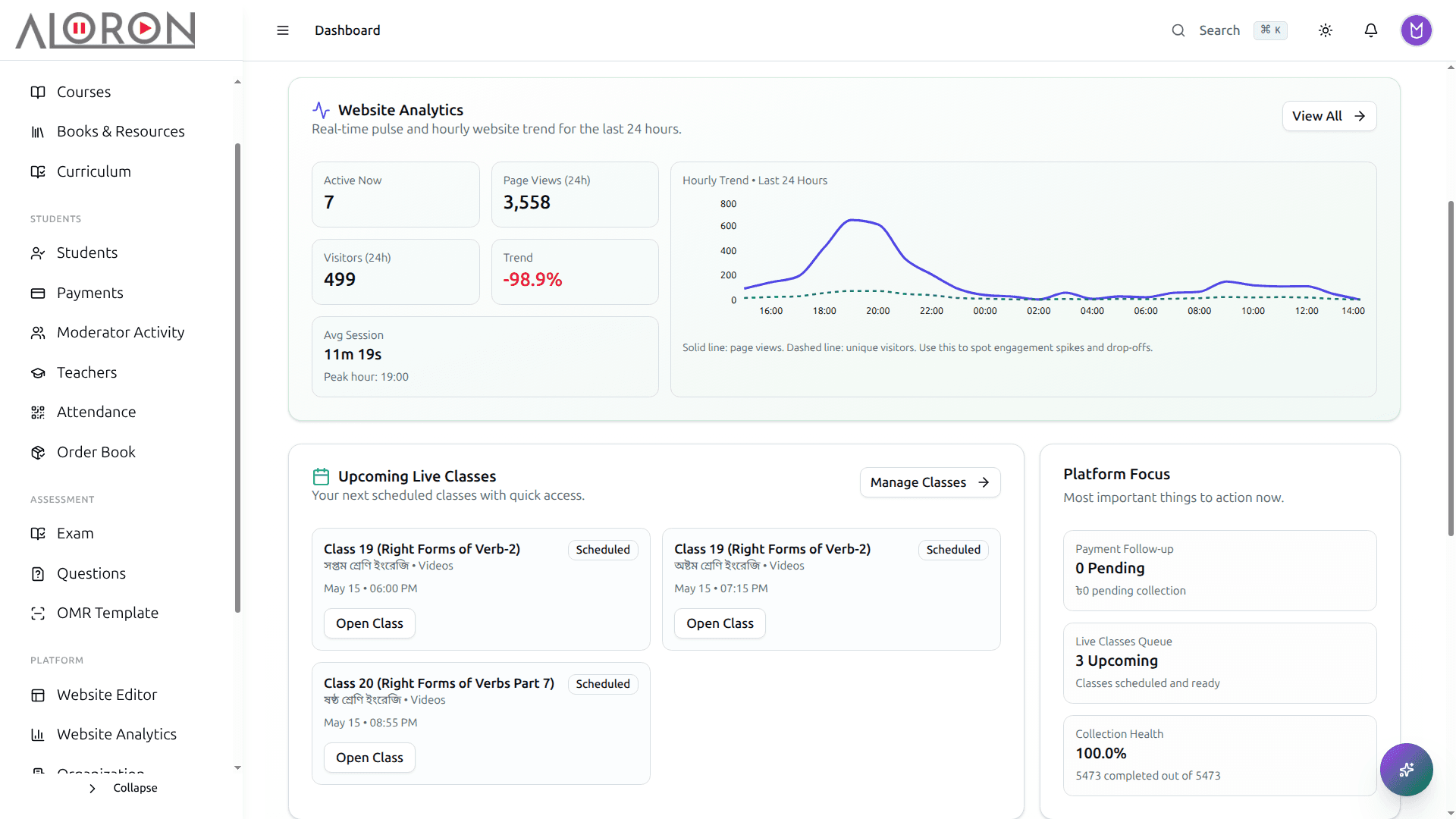
এই মুহূর্তে কতজন ভর্তি হলো, কত টাকা উঠল, পরীক্ষা কেমন চলছে, সিস্টেম ঠিক আছে কি না। যে প্রশ্নগুলোর জন্য তিনজনকে ডাকতে হতো, উত্তর এখানেই।
ওয়েবসাইট আপনি নিজেই বদলাতে পারবেন
যে ছেলেটা সাইটটা বানিয়ে দিয়েছিল, সে আর মেসেজের উত্তর দেয় না। একটা ব্যাচের ফি বদলাতে গেলে মেসেজ দিয়ে তিন দিন বসে থাকতে হয়। পেজটা এখানেই এডিট করুন, চোখের সামনে বদলাতে দেখুন, তৈরি হলে পাবলিশ করুন।
- সেকশন টেনে এনে বসান: কোডে হাত না দিয়েই সাইট বদলান
- নিজের ডোমেইন, নয়তো প্রথম দিন থেকেই ফ্রি yourname.course37.com সাবডোমেইন
- লেখার ভাষা খুঁজে না পেলে এআই খসড়া করে দেয়
- ইংরেজি না পড়তে পারা শিক্ষার্থীদের জন্য একাধিক ভাষায় পেজ
- প্রতিটি পেজে SEO সেটিংস, মেটা ট্যাগ আর Open Graph আগে থেকেই বসানো
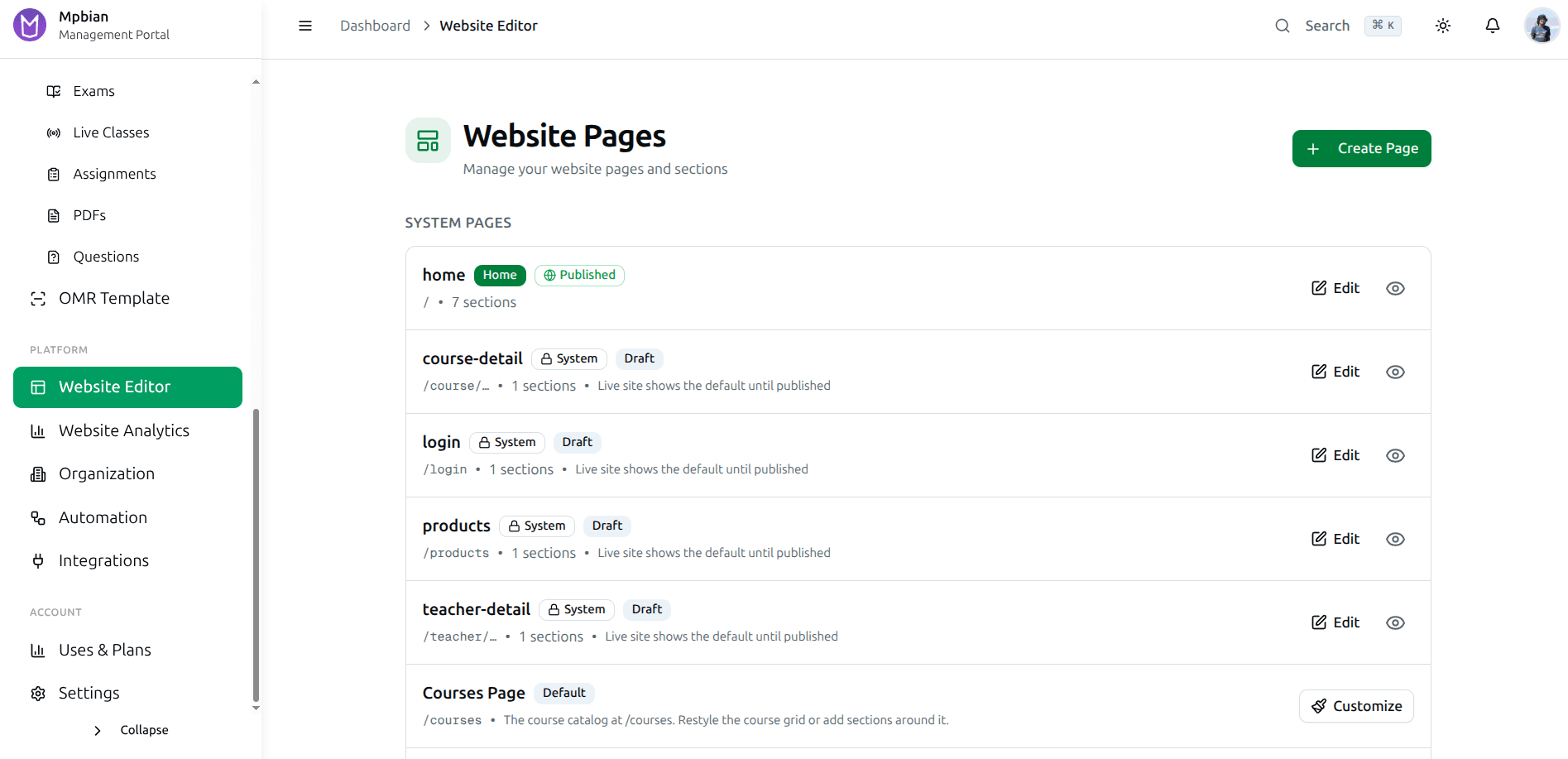
হোম, কোর্স, ভর্তি, আমাদের সম্পর্কে, যোগাযোগ। যেকোনোটা খুলে সেকশন সরান, লেখা নতুন করে লিখুন। নতুন ব্রাঞ্চ খুললেন, সেই সপ্তাহেই নতুন পেজ যোগ করুন।
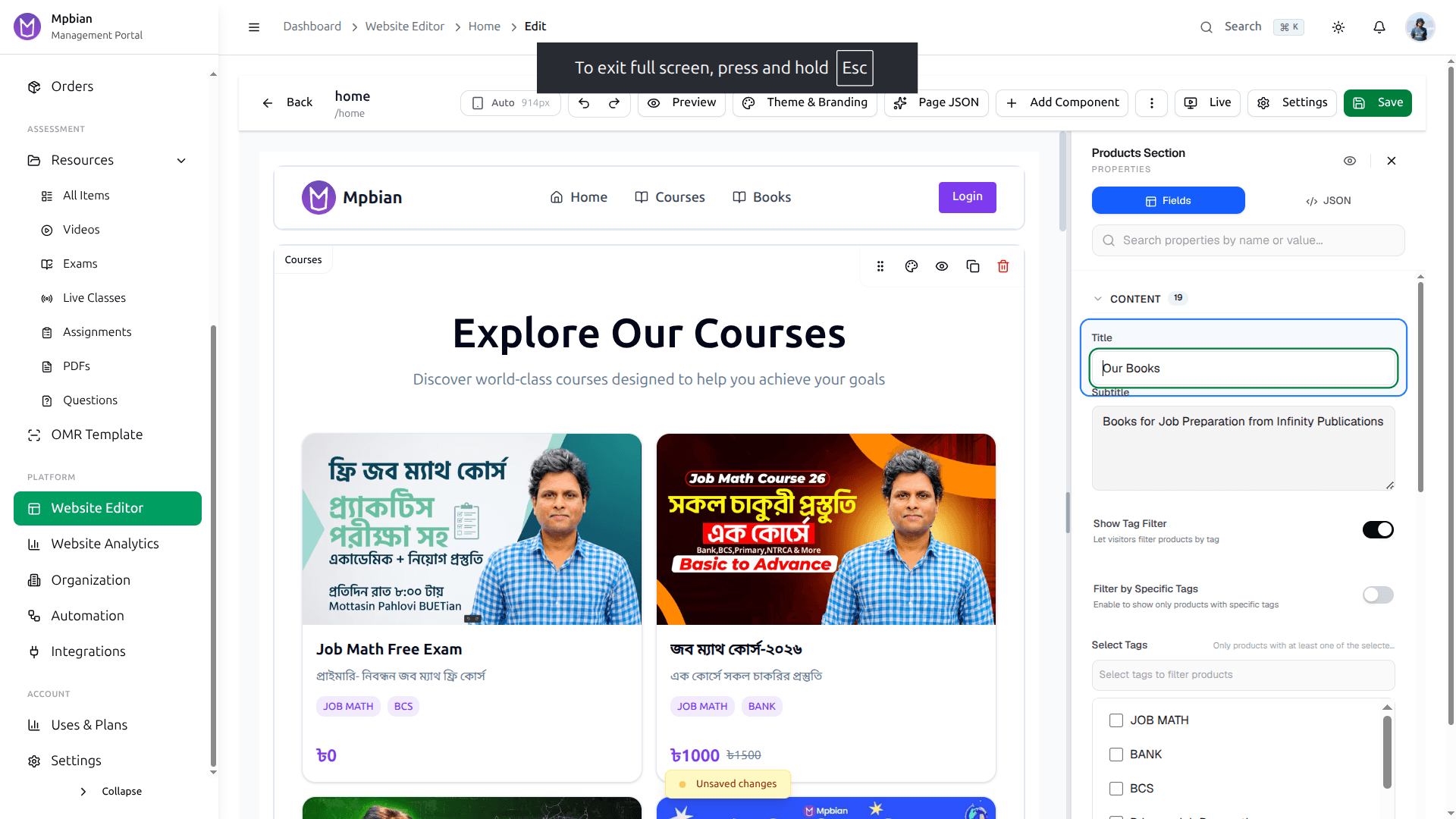
সেকশন টেনে এনে বসান, শিরোনাম, রং আর ফন্ট বদলান, পুরো পেজটা চোখের সামনে রেখেই। কোনো টিকিট নেই, ডেভেলপার নেই, অপেক্ষাও নেই।
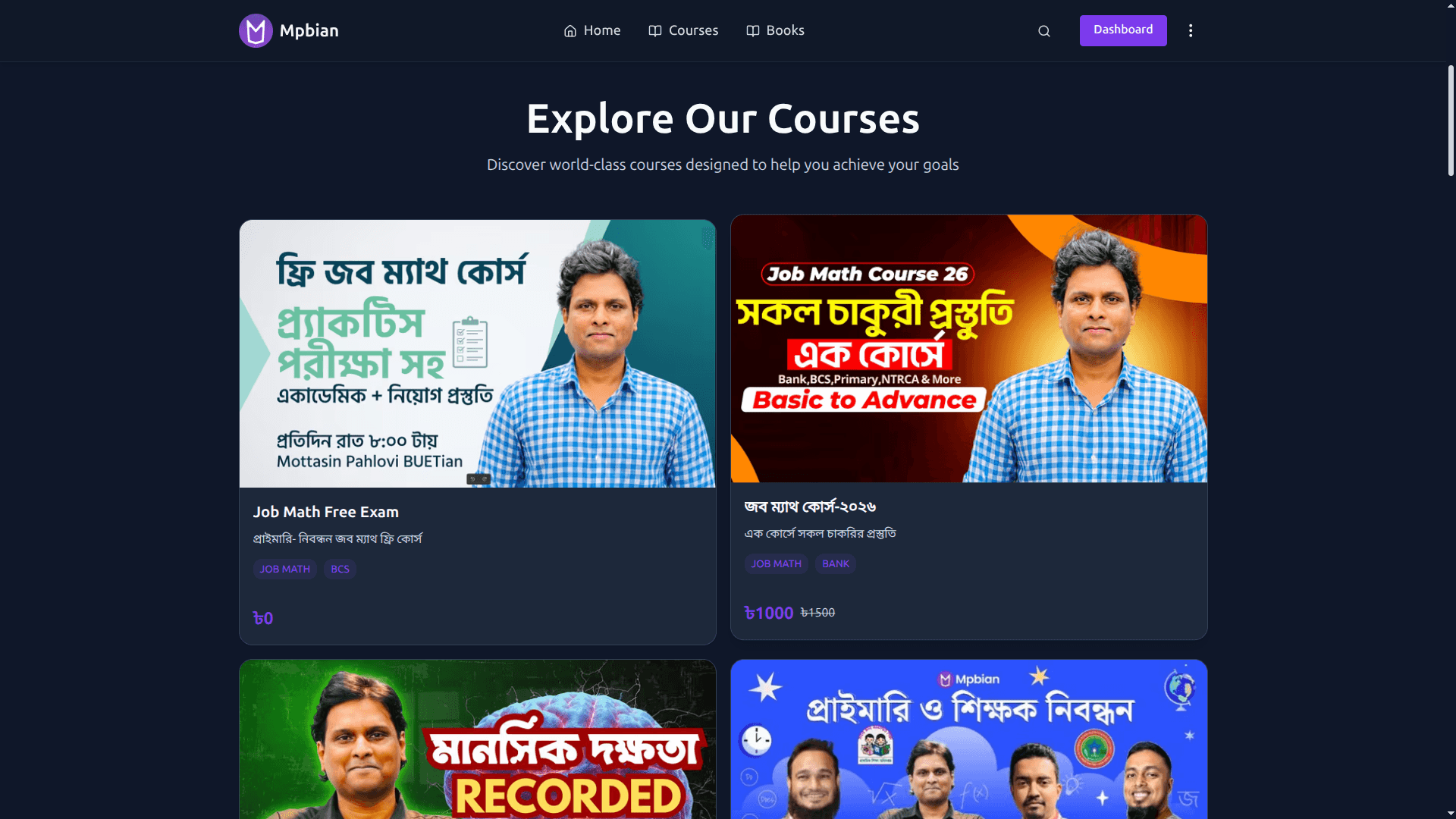
Course37-এ চলা একটি আসল গ্রাহকের সাইট: তাদের ডোমেইন, তাদের লোগো, তাদের সেকশন। আপনি যে এডিটরটা পাচ্ছেন, ঠিক সেটাতেই বানানো।
কোর্সটা আসলে থাকবে কোথায়
আজ একটা কোর্স মানে একটা ড্রাইভ ফোল্ডার, একটা লুকানো ভিডিও লিংক, আর কারও মাথায় রাখা ফির হিসাব। সিলেবাসটা একবার সাজিয়ে নিন, তারপর ঠিক করুন কে সেটা খুলতে পারবে।
- বিষয়, অধ্যায়, পাঠ: একটাই সিলেবাস, শিক্ষার্থী ধরে ধরে এগোতে পারে
- CDN দিয়ে ভিডিও যায়, মোবাইল ডেটাতেও বাফার করে না
- একই তালিকা থেকে একাধিক ব্রাঞ্চ আর একাধিক ব্যাচে ভর্তি
- কিস্তি বন্ধ হলে অ্যাকসেসও নিজে থেকেই বন্ধ হয়ে যায়
- কোর্স ও পাঠ ধরে অ্যাকসেস নিয়ন্ত্রণ: টাকা দিয়ে কেনা জিনিস ফ্রিতে ছড়ায় না
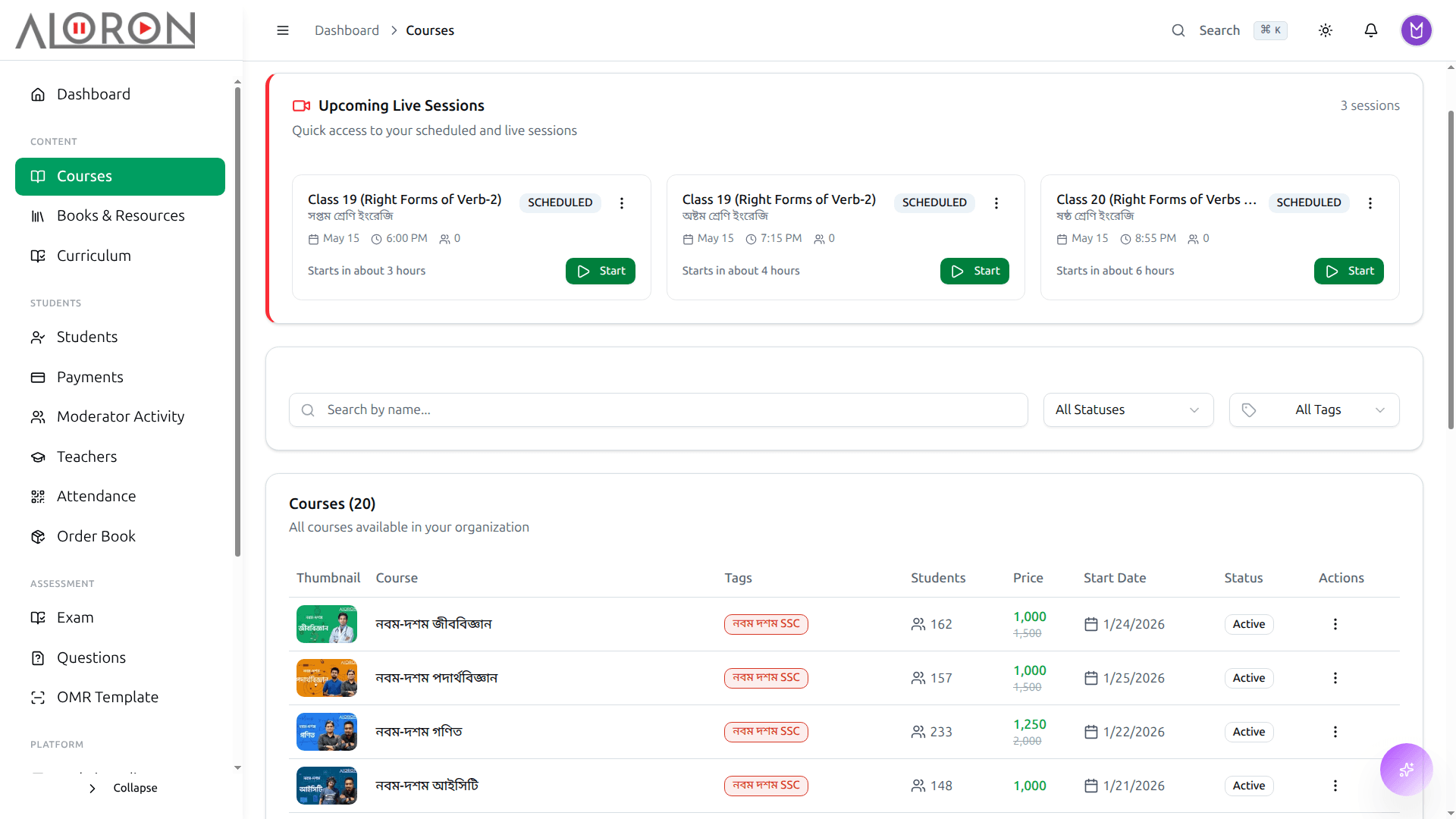
প্রতিটি কোর্সের সাথে কতজন ভর্তি, দাম কত, কোন ব্রাঞ্চ, আর সেখানেই এডিট করার সুযোগ। আলাদা এক্সেল শিটের সাথে মিলিয়ে রাখার ঝামেলা নেই।
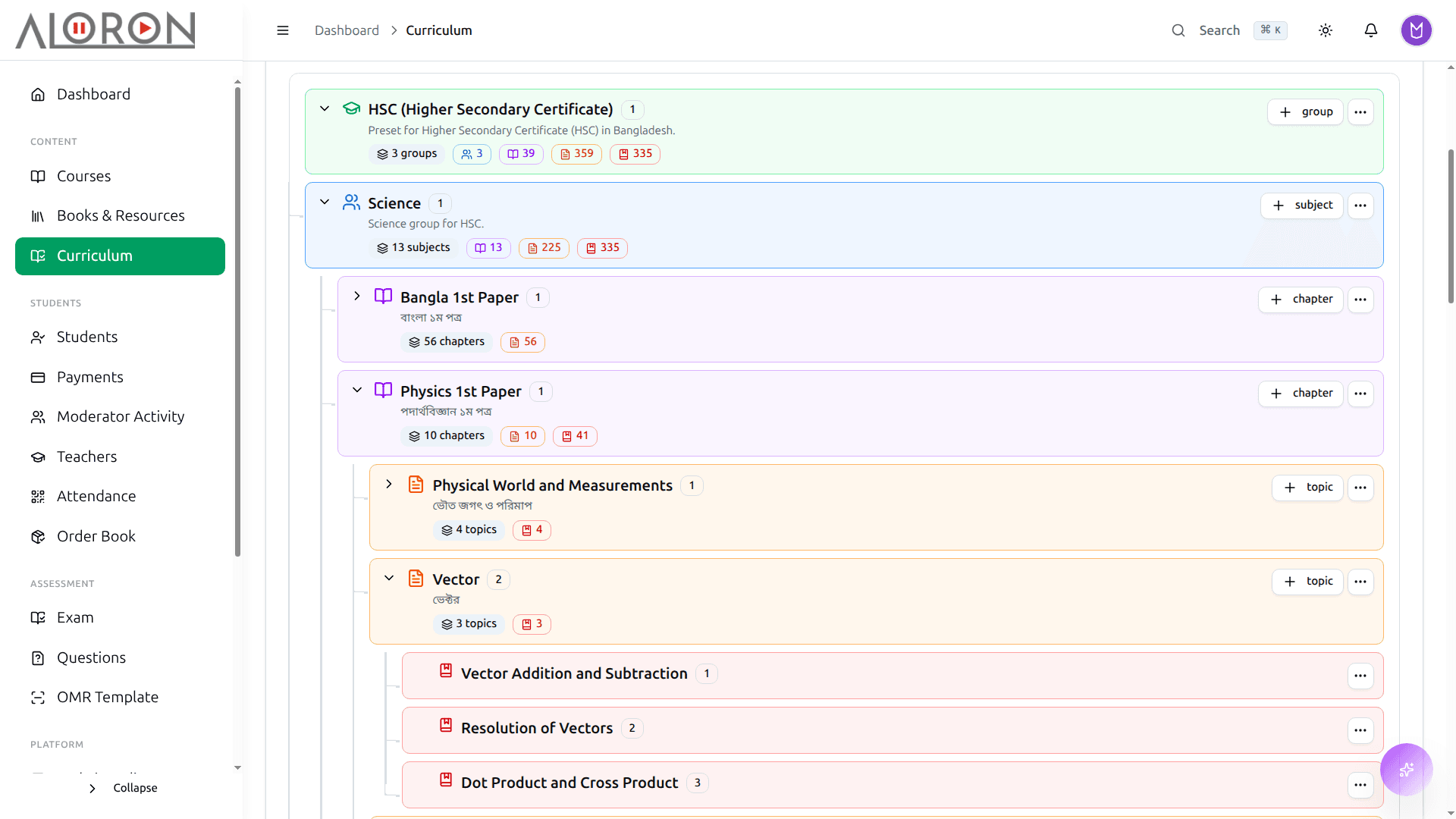
অধ্যায় ধরে ভিডিও, পিডিএফ আর অ্যাসাইনমেন্ট বসান। আপনি যে ক্রমে পড়ান, শিক্ষার্থী সিলেবাসটা সেই ক্রমেই পায়, লিংকের ভিড় হিসেবে নয়।
ক্লাসের লিংক আর হোয়াটসঅ্যাপ গ্রুপে ঘুরবে না
লিংকটা গ্রুপে দিলেন, তারপর ১১ বার "লিংকটা দিন" এর জবাব দিলেন, তারপর রেকর্ডিংটা কোথায় যেন আপলোড করে ভুলে গেলেন। ক্লাসটা এখানে শিডিউল করুন, লিংক আর রেকর্ডিং দুটোই শিক্ষার্থীর ড্যাশবোর্ডে পৌঁছে যাবে।
- Zoom আর Google Meet যুক্ত: একবার শিডিউল করুন, শিক্ষার্থীরা লিংক পেয়ে যাবে
- ক্লাস থেকেই হাজিরা, আলাদা খাতায় আর তুলতে হয় না
- চ্যাট, পোল আর প্রশ্নোত্তর, কে এখনও সাথে আছে বোঝা যায়
- ক্লাস শেষ হতেই রেকর্ডিং তৈরি, ঠিক ক্লাসটার নিচেই জমা
- স্লাইড, বিগত সালের প্রশ্ন আর সমাধান করা অঙ্ক দেখাতে স্ক্রিন শেয়ার
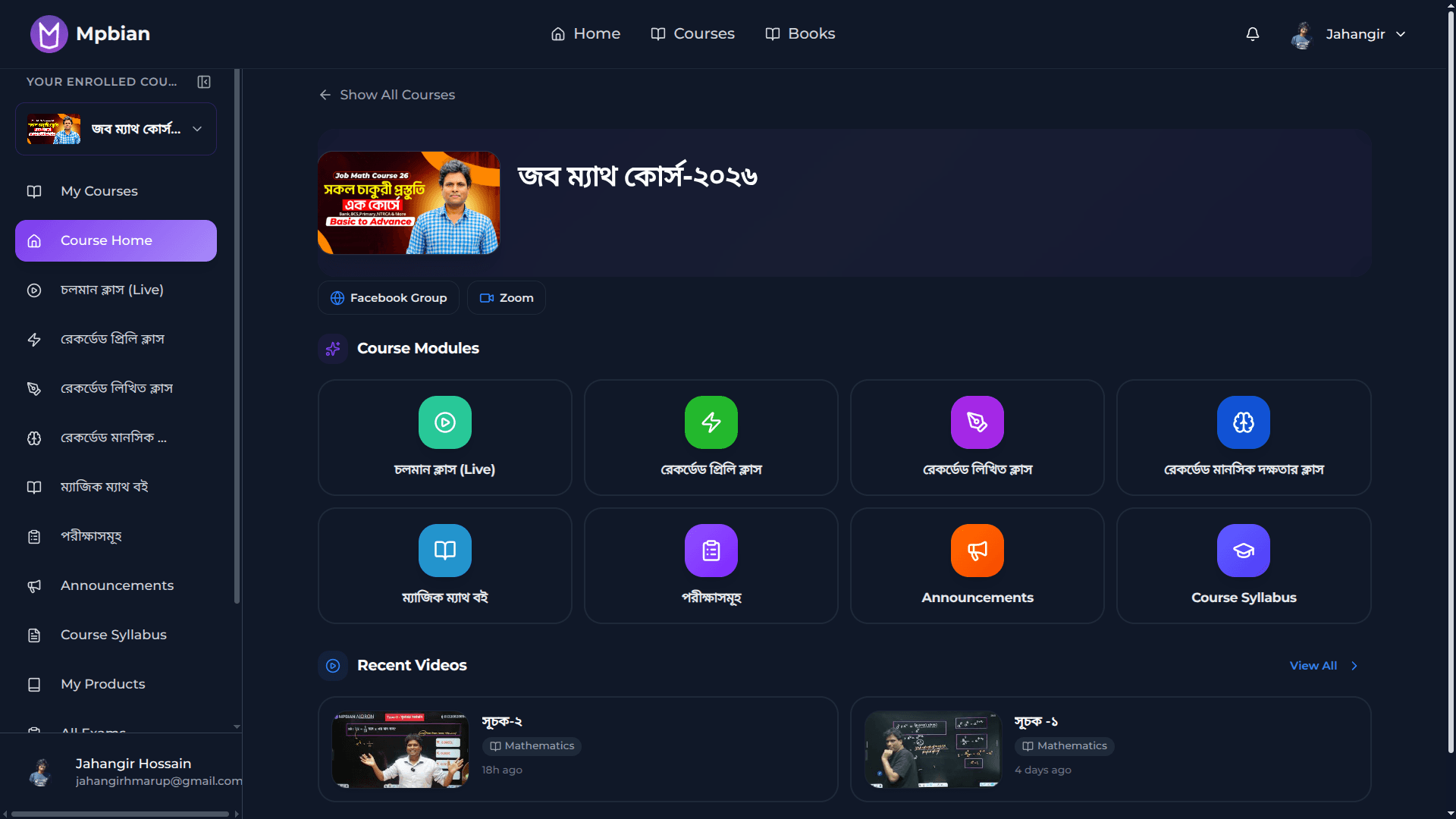
তার কোর্স, আজকের লাইভ লিংক, আগের রেকর্ডিং আর ক্লাসের রিসোর্স এক জায়গায়। কোনোটার জন্যই আপনাকে মেসেজ দিতে হবে না।
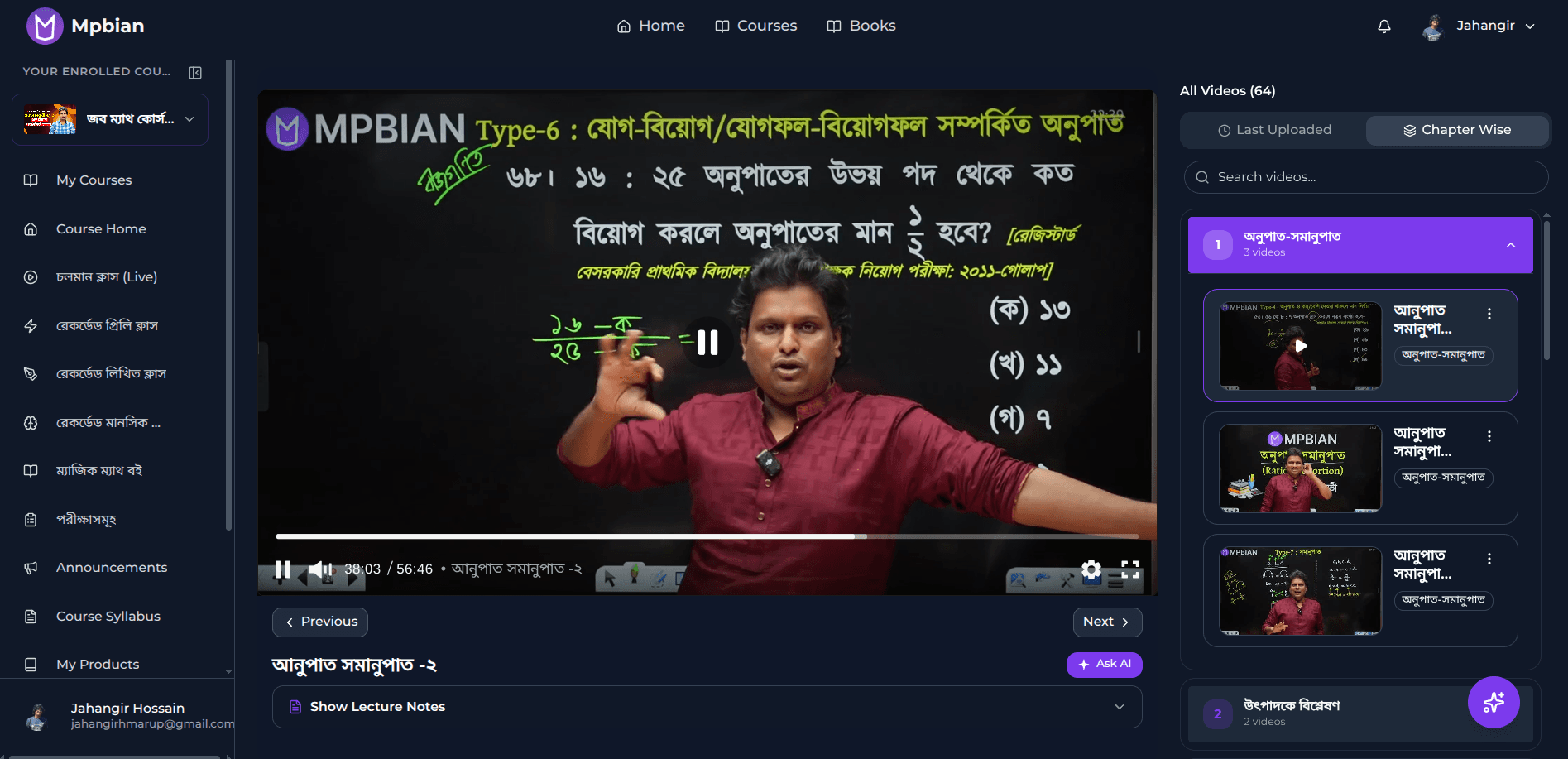
রেকর্ডিং নিজেই গিয়ে তার ক্লাসের নিচে বসে। মঙ্গলবারের ক্লাস যে মিস করেছে, সে মঙ্গলবারটাই খুঁজে পায়।
খাতা দেখতে গিয়ে রাত পার হবে না
খাতার স্তূপ টেবিলে, লাল কলম হাতে, আর কাল সারাদিন এক্সেল শিটে মেধা তালিকা টাইপ করতে হবে। প্রশ্ন একবার লিখুন, পরীক্ষা নিন, সেই সন্ধ্যাতেই রেজাল্ট দিয়ে দিন।
- একই প্রশ্নপত্রে এমসিকিউ, সৃজনশীল আর সংক্ষিপ্ত প্রশ্ন
- আপনার অধ্যায় থেকে Anthropic, Gemini বা Groq দিয়ে প্রশ্নের খসড়া
- লাইভ প্রিভিউসহ LaTeX এডিটর: সমীকরণ ছাপায় ঠিকঠাক আসে
- সময় বেঁধে অনলাইন পরীক্ষা, কে ট্যাব বদলাল সেটাও রেকর্ডে থাকে
- একই প্রশ্ন থেকে এলোমেলো করে A/B/C/D সেট তৈরি
- মেধা তালিকা, পজিশন আর প্রশ্নভিত্তিক বিশ্লেষণ, এক্সেল শিট ছাড়াই
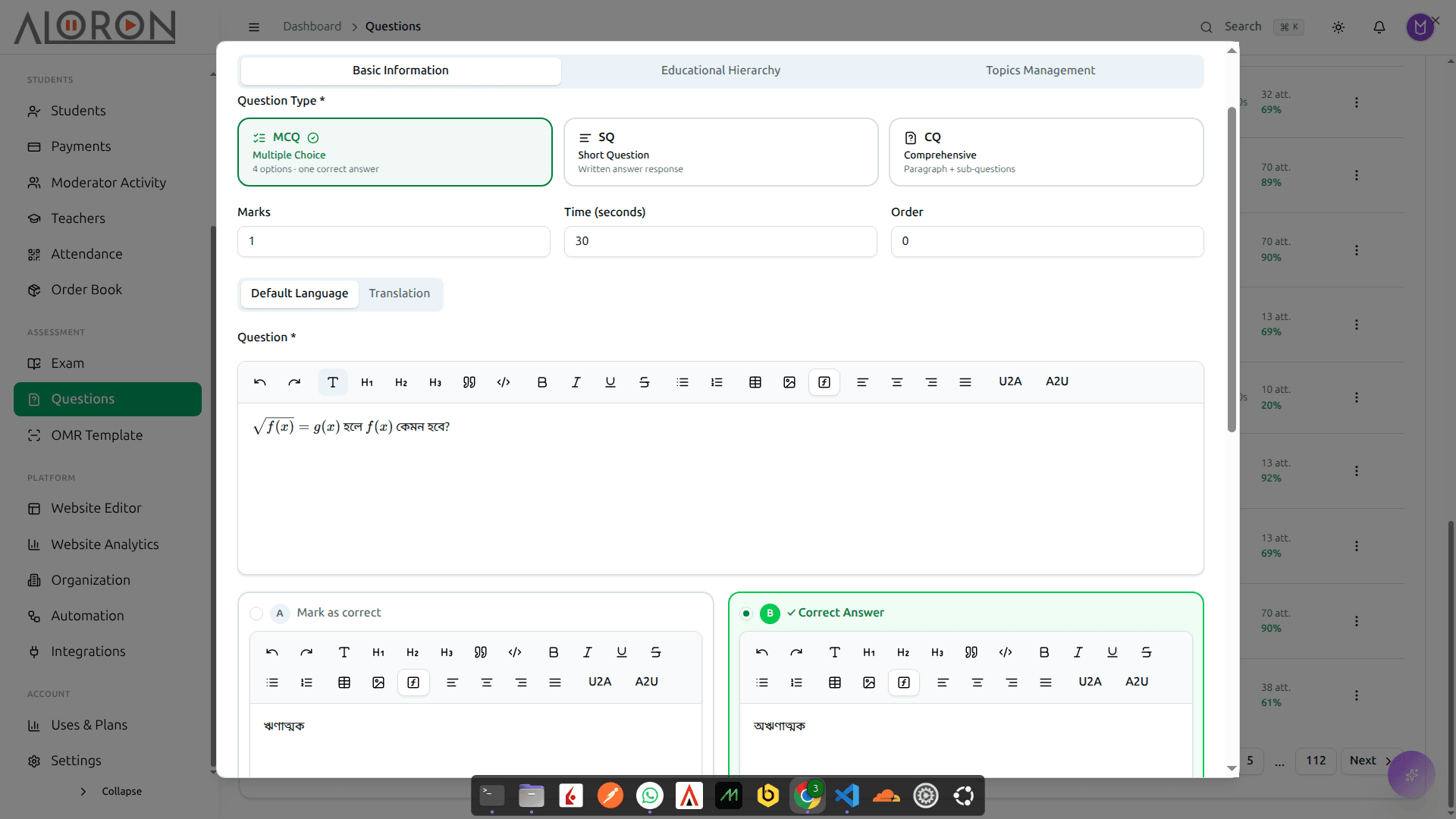
গণিত আর বিজ্ঞানের প্রশ্ন লিখুন, পাশেই লাইভ প্রিভিউ, লেখার ভেতরেই চিত্র বসান। স্ক্রিনে যা দেখছেন, কাগজে ছাপাও ঠিক তাই হবে।
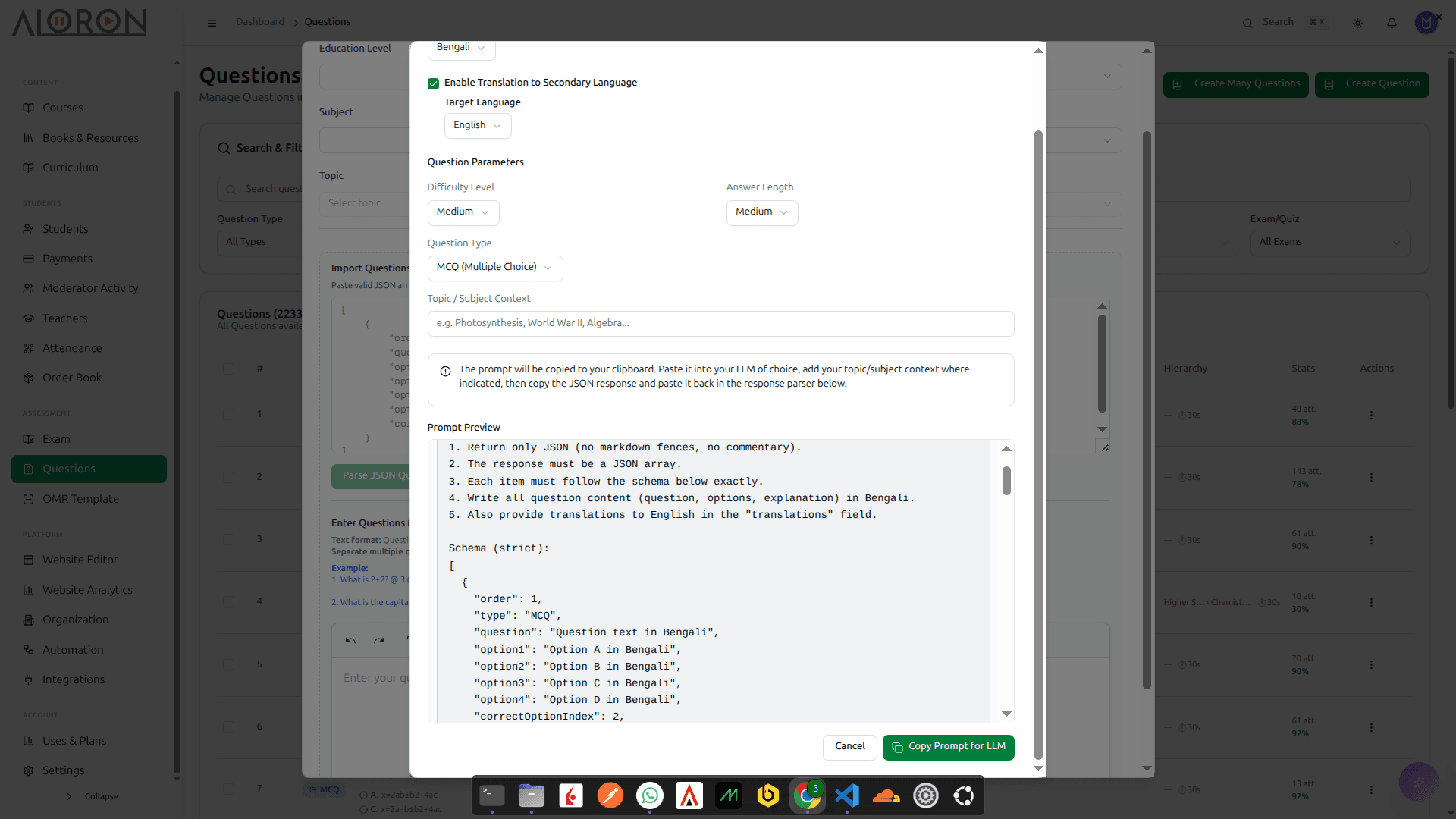
অধ্যায় আর কঠিনের মাত্রাটা বলে দিন। Anthropic Claude, Google Gemini বা Groq এমসিকিউ, সৃজনশীল আর সংক্ষিপ্ত প্রশ্নের খসড়া করে দেয়। আপনি ঠিকঠাক করে অনুমোদন দেন।
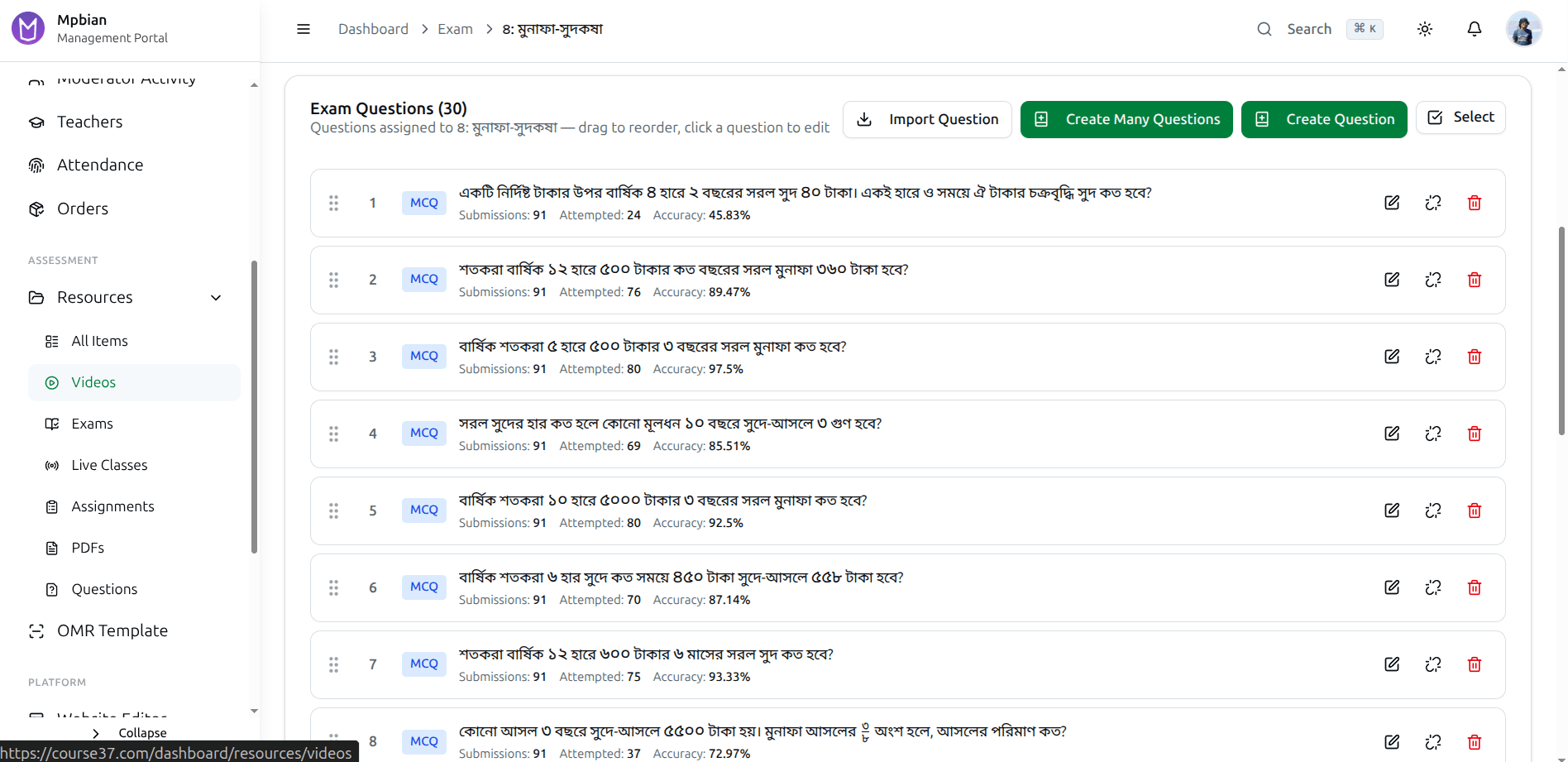
প্রতিটি প্রশ্ন বিষয়, অধ্যায় আর কঠিনের মাত্রা ধরে সাজানো। পরের টার্মের প্রশ্নপত্র শুরু হয় আগে লেখা প্রশ্ন থেকে, ফাঁকা পাতা থেকে নয়।
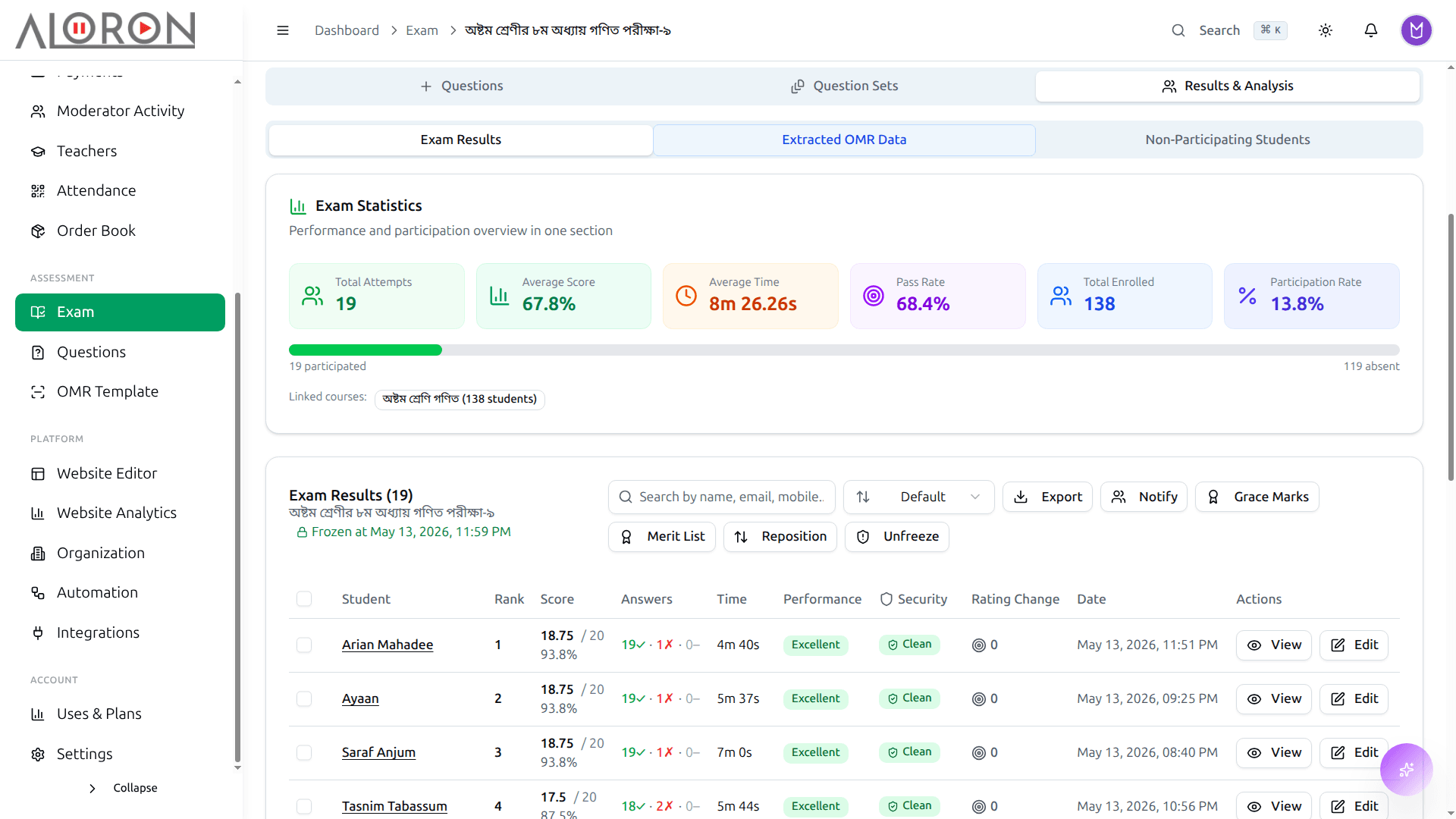
পরীক্ষা শেষ হওয়ামাত্র পজিশন, নম্বর, পার্সেন্টাইল আর প্রশ্নভিত্তিক বিশ্লেষণ। পিডিএফ নামিয়ে নোটিশ বোর্ডে টাঙিয়ে দিন।
খাতা দেখবে স্ক্যানার, আপনি নন
কাগজের পরীক্ষা শেষে এখনও পড়ে থাকে উত্তরপত্রের স্তূপ আর টিক দিতে দিতে চলে যাওয়া একটা গোটা সন্ধ্যা। ওএমআর শিটটা এখানে বানান, সাধারণ কাগজে ছাপান, পূরণ করা কপিগুলো স্ক্যান করুন, মেধা তালিকা পড়ে নিন।
- যত খুশি প্রশ্ন, যেকোনো ভাষায় শিট বানান: ছাপানো শিট লাগবে না
- পিডিএফ নামিয়ে অফিসের প্রিন্টারে সাধারণ কাগজেই ছাপান
- হাতে থাকা স্ক্যানারেই স্ক্যান: আলাদা কোনো যন্ত্র কিনতে হবে না
- একবারেই A/B/C/D সব সেটের খাতা দেখে, প্রতি সেটের উত্তরপত্র আলাদা ধরে
- বাঁকা, কুঁচকানো বা কম মানের স্ক্যানও ঠিকঠাক পড়ে নেয়
- শেষ শিটটা স্ক্যান হওয়ার সাথে সাথেই মেধা তালিকা তৈরি
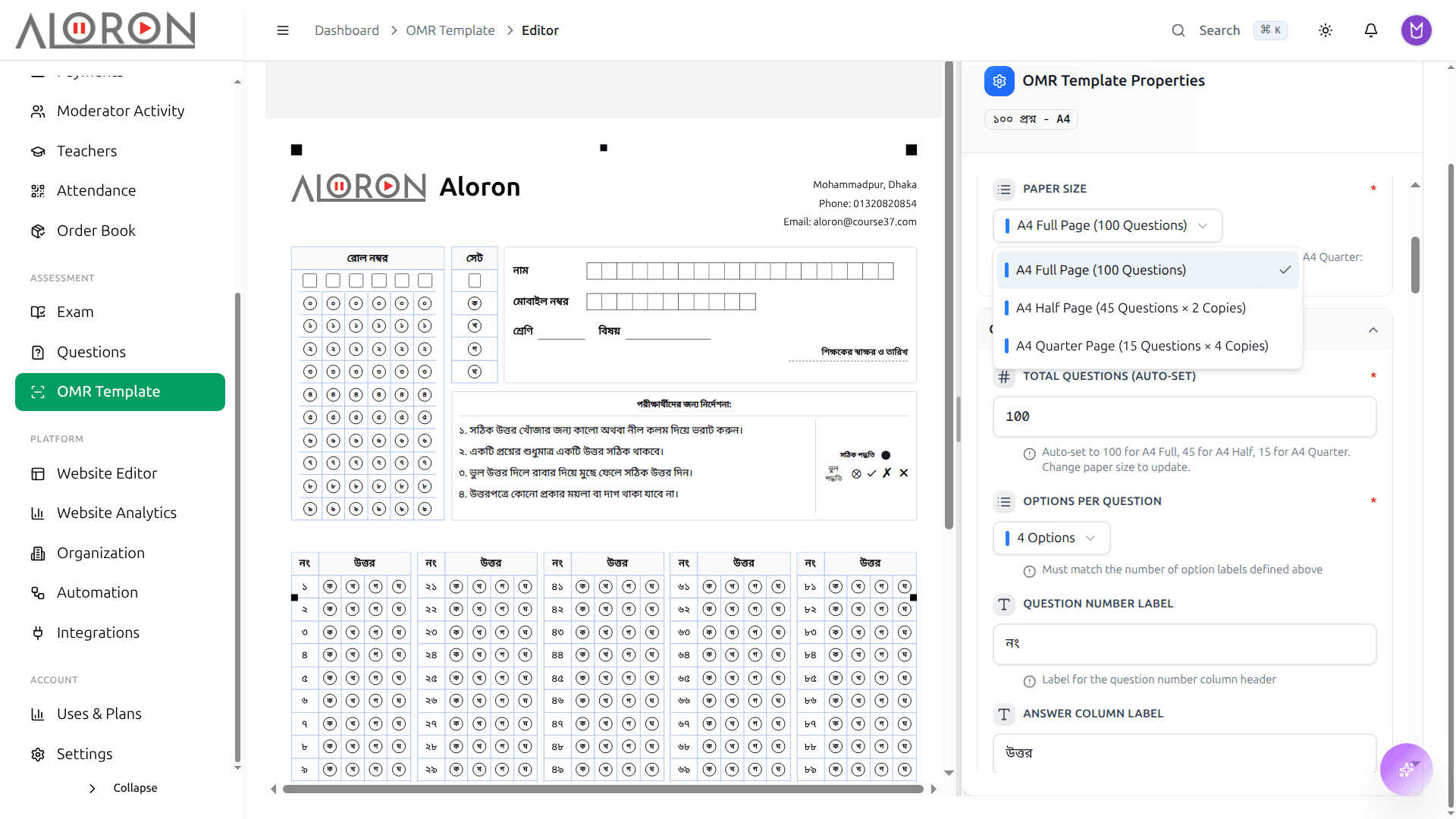
৫০, ১০০ বা যত খুশি প্রশ্নের উত্তরপত্র, যেকোনো ভাষায় বানিয়ে ছাপার উপযোগী পিডিএফ নামিয়ে নিন। ছাপানো ওএমআর শিট আর কিনতে হবে না।
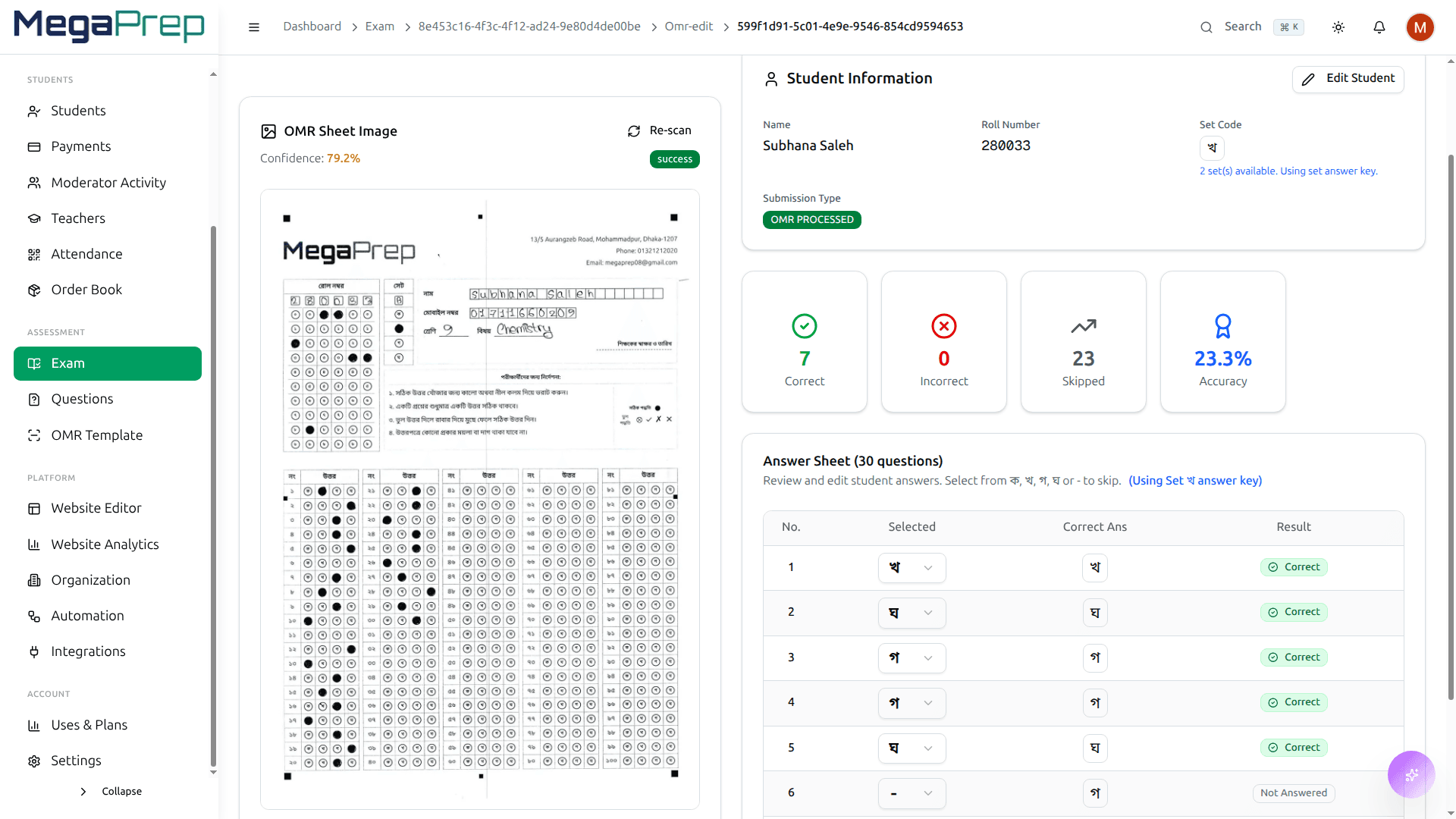
অফিসে যে স্ক্যানারটা এমনিতেই আছে, তাতেই পূরণ করা শিটগুলো চালান। ডিটেকশন অ্যালগরিদম বৃত্তগুলো পড়ে নিয়ে প্রতিটি সেটের খাতা দেখে ফেলে।
অভিভাবক ফোন দিলে উত্তরটা হাতেই থাকে
এক বাবা জানতে চান তাঁর মেয়ে কেমন করছে। হাজিরা খাতায়, নম্বর নোটবুকে, পেমেন্ট এক্সেল শিটে, তাই আপনাকে বলতে হয় পরে ফোন করছি। একটা প্রোফাইলেই তিনটা থাকে।
- খুঁজে বের করা যায় এমন তালিকা, গোটা ব্যাচে একসাথে কাজ করার সুযোগ
- প্রতি শিক্ষার্থীর একটাই প্রোফাইল: ভর্তি, হাজিরা, নম্বর, পেমেন্ট
- পুরো টার্ম জুড়ে পরীক্ষার ইতিহাস, সাথে পজিশন আর পার্সেন্টাইল
- লাইভ ক্লাস আর রেকর্ড করা ক্লাস, দুটোতেই হাজিরা জমা হয়
- আপনার নিজের নাম আর লোগো দেওয়া ছাপার উপযোগী রেজাল্ট কার্ড
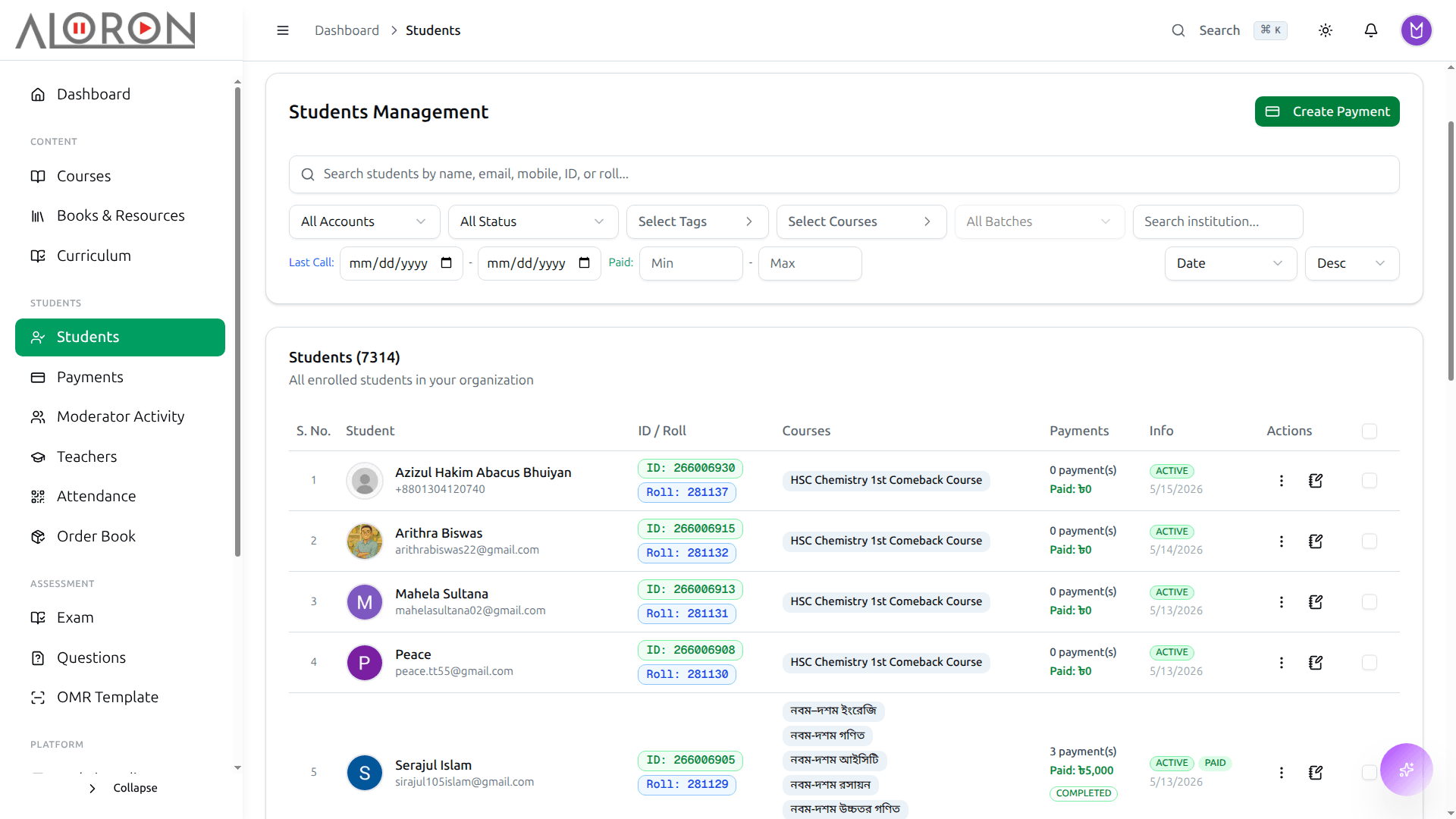
প্রতিটি শিক্ষার্থীর ব্যাচ, ভর্তি আর পেমেন্টের অবস্থা, এক সেকেন্ডে ফিল্টার করা যায়। একটা একটা নাম ধরে নয়, গোটা ব্যাচে একসাথে কাজ সারুন।
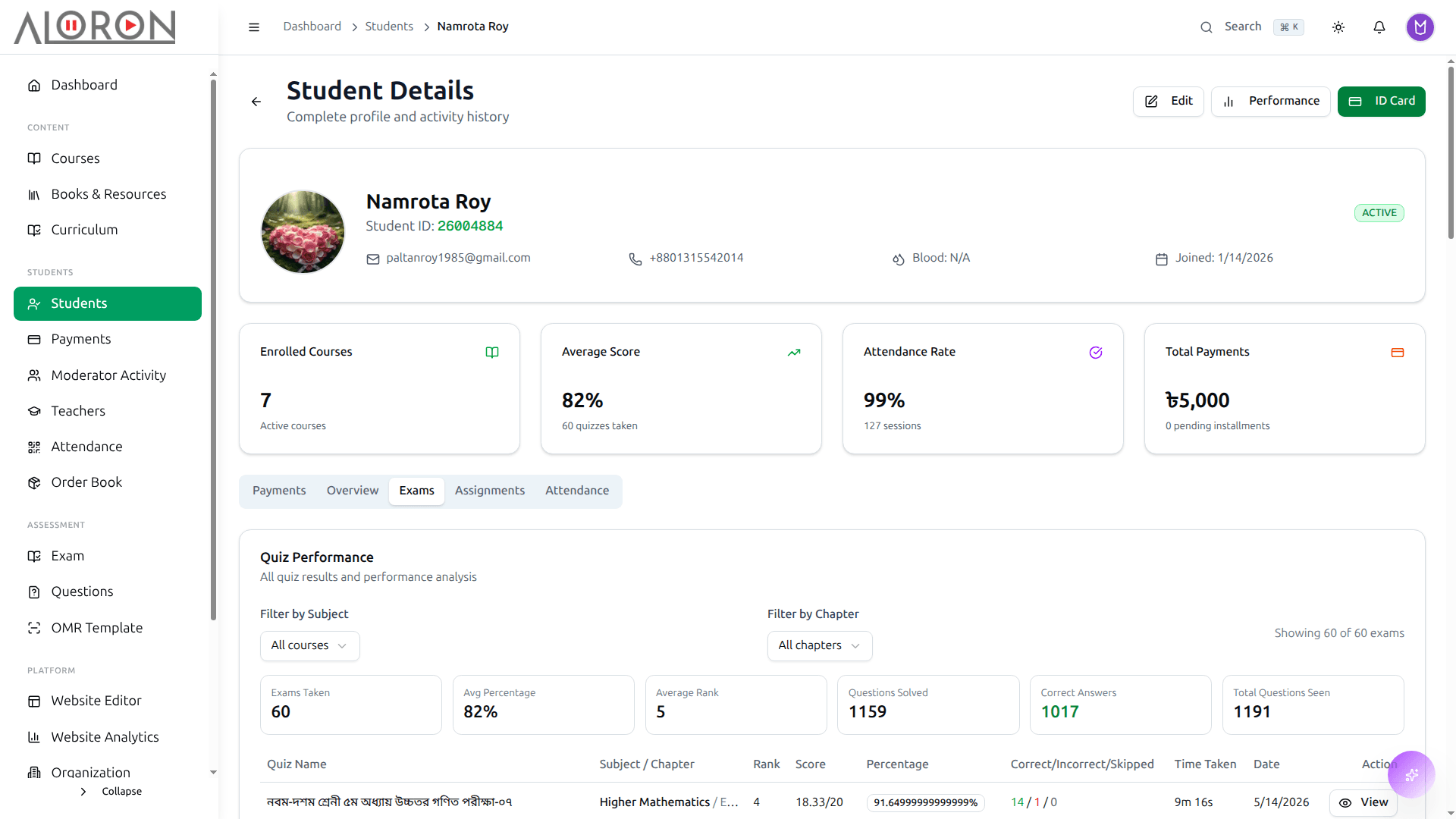
কোর্স, হাজিরা, পরীক্ষার ইতিহাস, অ্যাসাইনমেন্ট আর পেমেন্ট একসাথে। অভিভাবক ফোনে থাকতে থাকতেই উত্তরটা দিয়ে দিন।
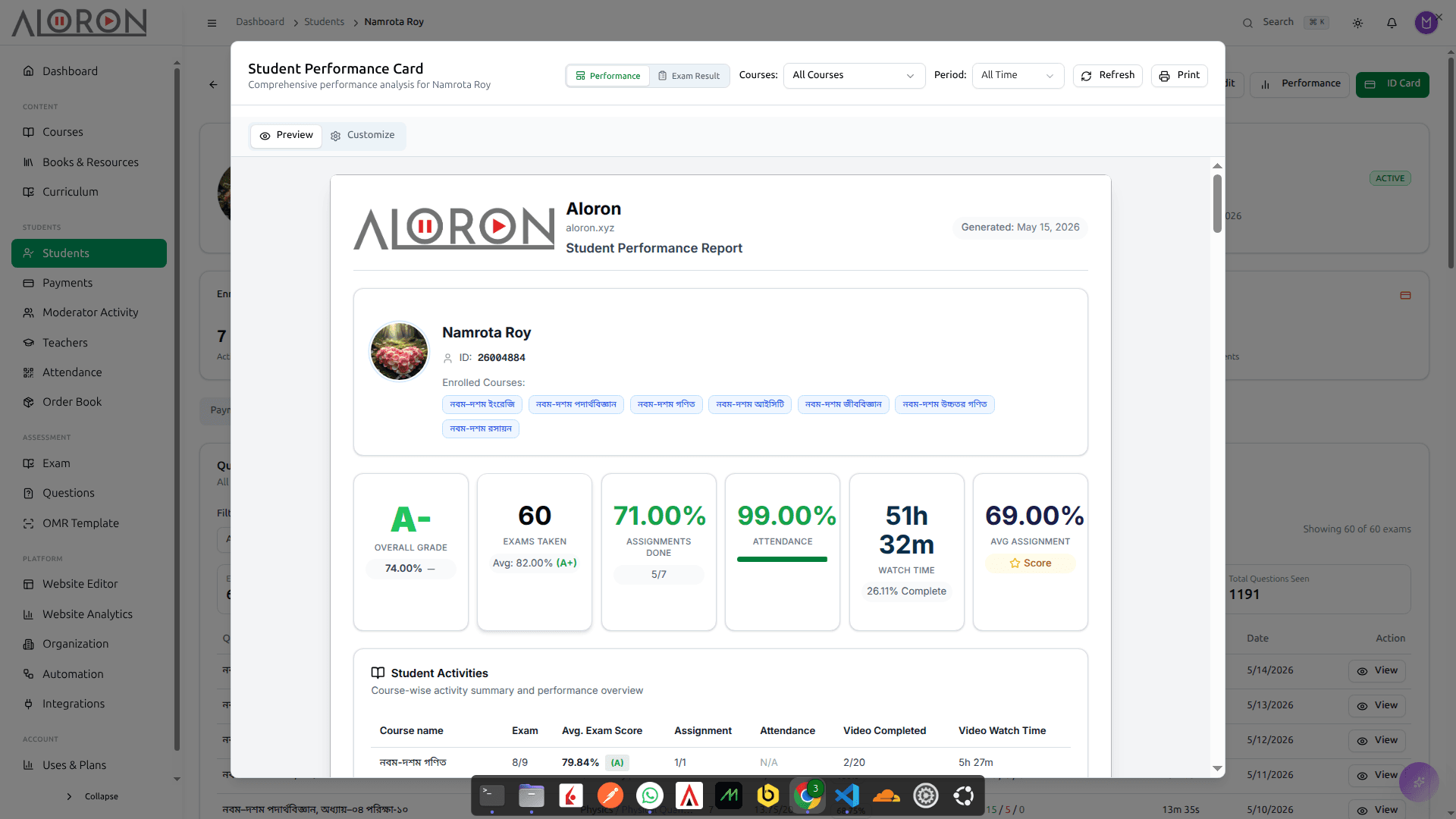
সময়ের সাথে নম্বর কোন দিকে যাচ্ছে, কোন বিষয়ে কতটা জোর। কে ফেল করল শুধু তা নয়, কোন অধ্যায়টা আবার পড়াতে হবে সেটাও বলে দেয়।
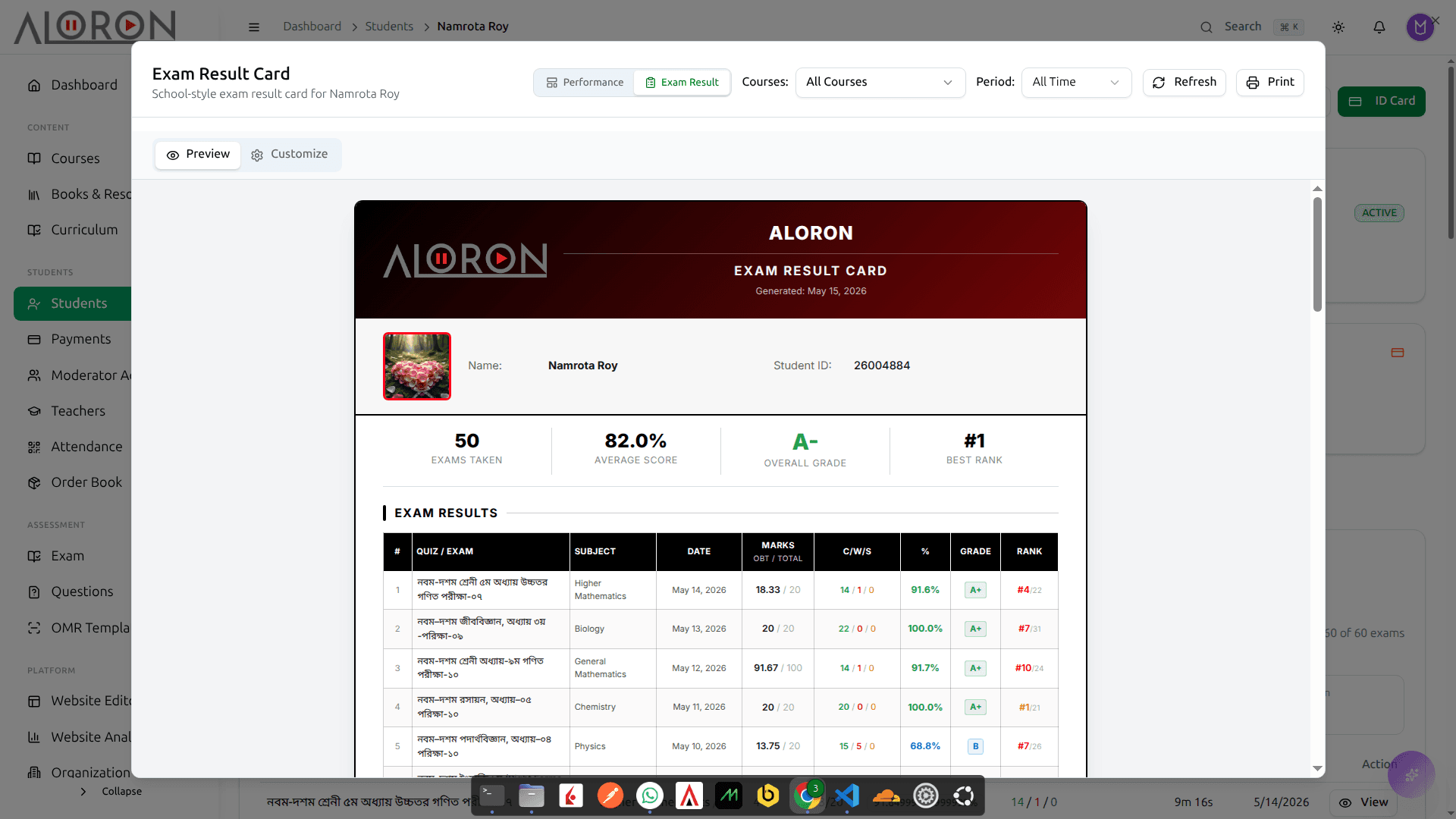
বিষয়ভিত্তিক নম্বর, পজিশন আর মন্তব্যসহ ছাপার উপযোগী কার্ড, আপনার প্রতিষ্ঠানের নামেই। অভিভাবক সমাবেশে হাতে ধরিয়ে দিন।
রোল কল ছাড়াই ক্লাস শুরু
প্রতি ক্লাসের ১০ মিনিট চলে যায় নাম ডাকতে, আর তারপরও খাতায় লেখা থাকে যে ছেলেটা আসেনি সে উপস্থিত ছিল। দরজায় একটা ডিভাইস বসান। স্ক্যানটাই হাজিরা, আর শিক্ষক বোর্ড পর্যন্ত পৌঁছানোর আগেই সেটা সিস্টেমে উঠে যায়।
- ZKTeco ডিভাইস সিরিয়াল নম্বরে যোগ হয়, প্রতিটি স্ক্যান সাথে সাথেই পাঠায়
- আঙুলের ছাপ, মুখ, RFID কার্ড, পাসওয়ার্ড বা কিউআর, ডিভাইস যা সাপোর্ট করে
- প্রতি ক্লাসরুমে একটা ডিভাইস, বা গেটে দুটো, একটা ঢোকার আর একটা বেরোনোর হিসাব রাখে
- ক্লাসের সময়সূচি ধরে উপস্থিত না দেরি ঠিক হয়, ছাড়ের সময়টুকু আপনি বেঁধে দেন
- একই যন্ত্রে শিক্ষার্থী, শিক্ষক আর অফিস স্টাফ, সবার নিবন্ধন
- যে বন্ধু আসেনি, তার হাজিরা আরেকজন দিয়ে দিতে পারবে না
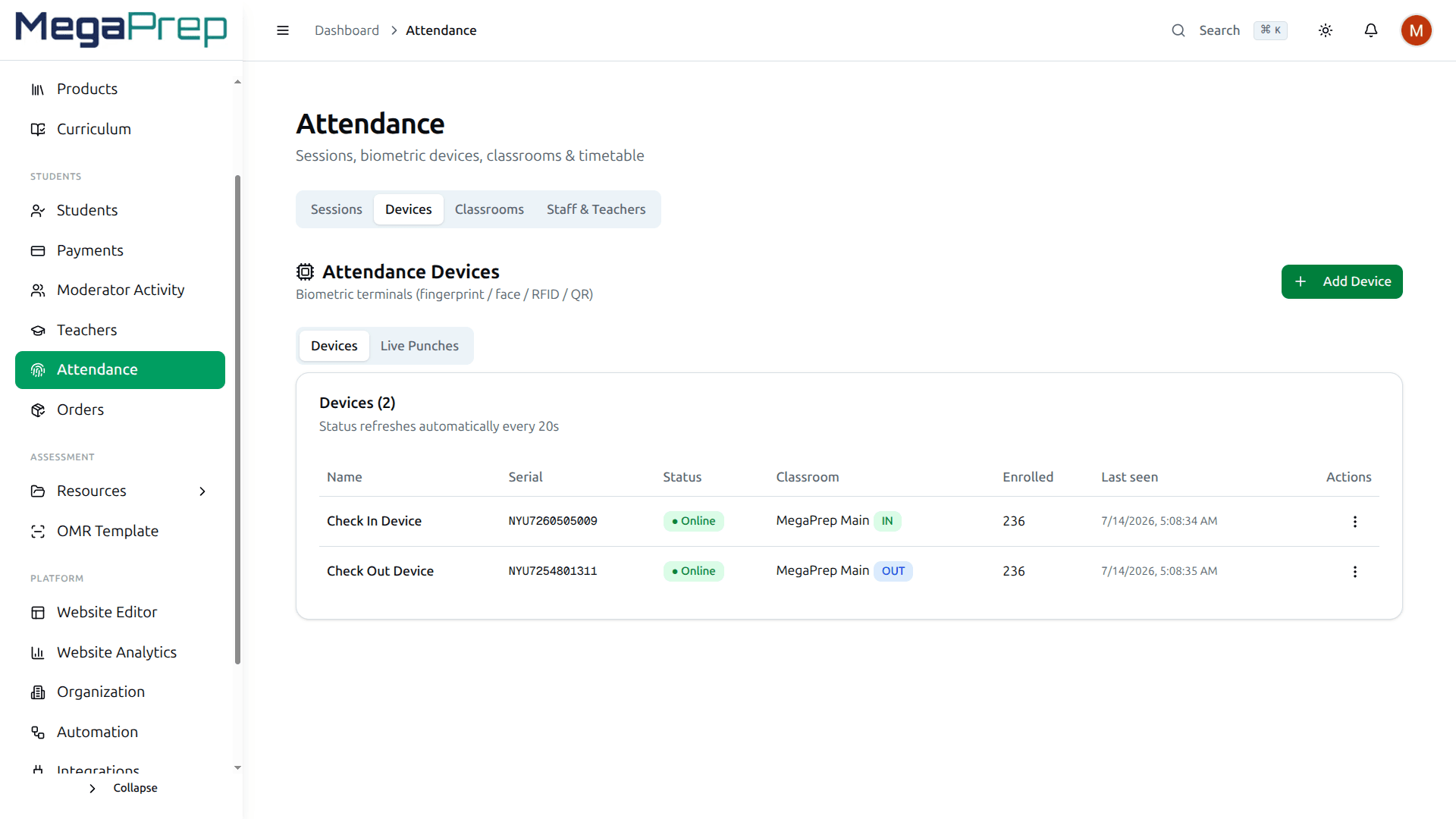
সিরিয়াল নম্বর দিয়ে ZKTeco ডিভাইস যোগ করুন আর একটা ক্লাসরুমের সাথে বেঁধে দিন। প্রতিটি পাঞ্চ সাথে সাথেই চলে আসে, আর কোন ডিভাইস থেকে শেষ কবে খবর এসেছে সেটাও দেখা যায়, ফলে নষ্ট ডিভাইস চুপচাপ হাজিরা নেওয়া বন্ধ করে দিতে পারে না।
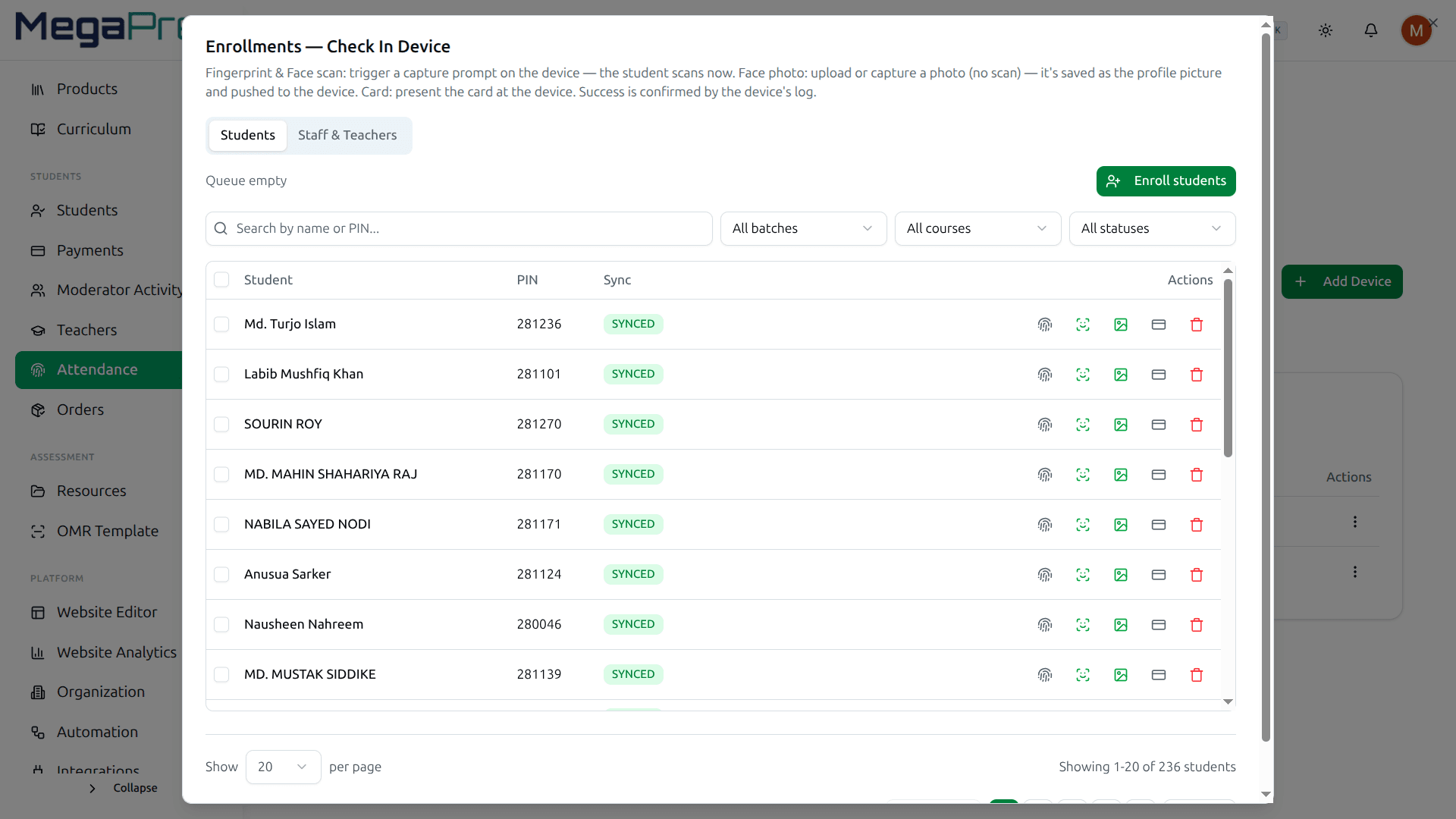
শিক্ষার্থীর প্রোফাইল থেকেই তাকে ডিভাইসে পাঠিয়ে দিন। ডিভাইস যেটা সাপোর্ট করে, আঙুলের ছাপ, মুখ বা RFID কার্ড। ডিভাইসে তার পিন হলো তার রোল নম্বর, নতুন করে কিছু মুখস্থ করতে হয় না।
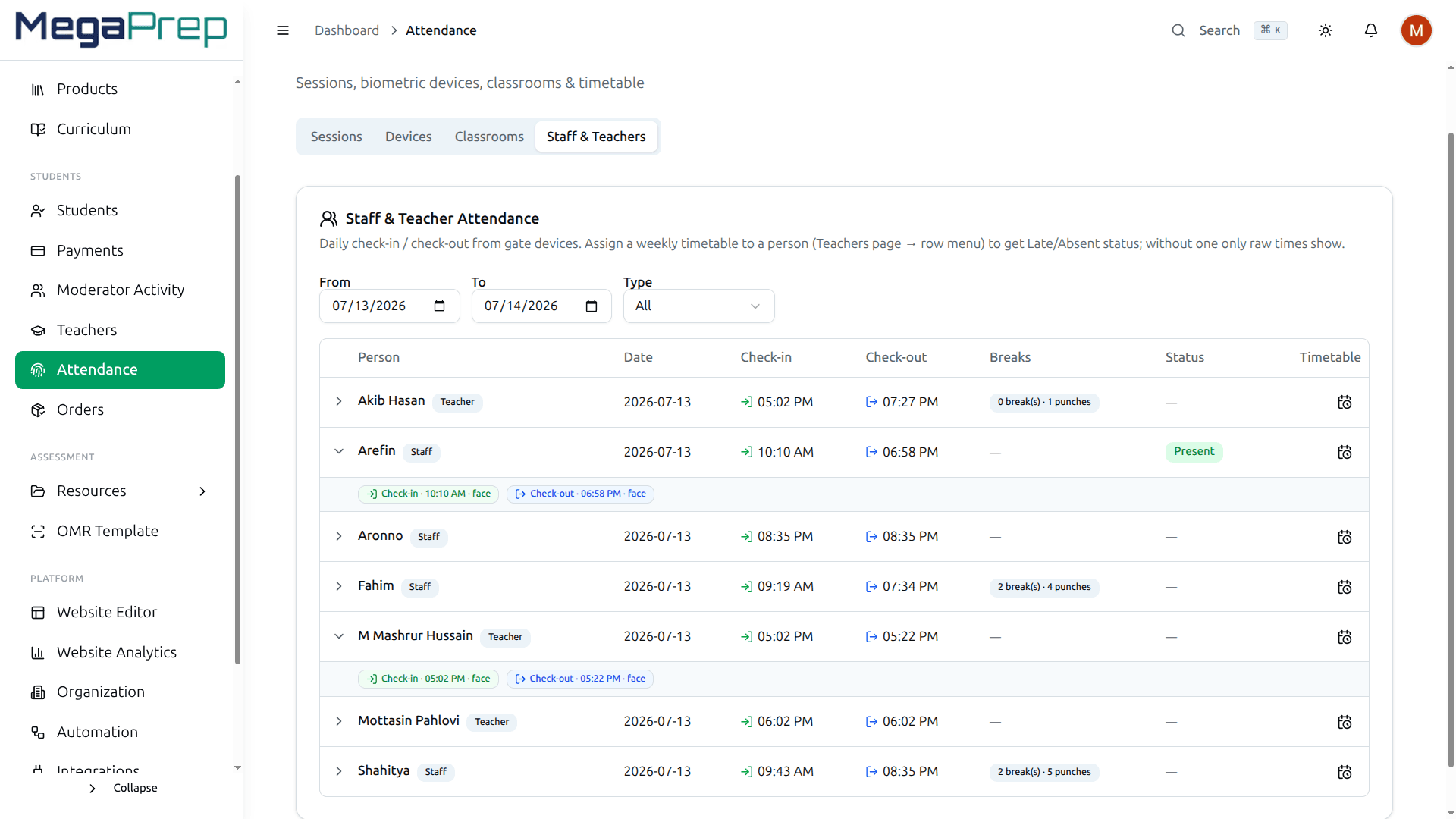
শুধু শিক্ষার্থী নয়। শিক্ষক আর অফিসের স্টাফও স্ক্যান করেন, ফলে বেতনের দিন আপনি যে হাজিরা দেখেন সেটা দরজার ডিভাইসের হাজিরা, পরে কারও হাতে লেখা নয়।
যে কিস্তিটার খোঁজ কেউ নেয়নি
শুক্রবারটা চলে যায় এক্সেল শিটের পেছনে: কে দিয়েছে, কে অর্ধেক দিয়েছে, কে গত মাসে কথা দিয়ে আর আসেনি। টাকা যখনই ঢোকে, হিসাব নিজেই লেখা হয়ে যায়, আর যেটা ঢোকেনি সেটা লাল দাগ পেয়ে যায়।
- SSLCommerz দিয়ে bKash, Nagad, Rocket, সাথে Stripe কার্ড, হিসাব একটাই খাতায়
- কিস্তির প্ল্যান, টাকা আসা বন্ধ হলে অ্যাকসেসও নিজে থেকেই বন্ধ
- পেমেন্ট হলেই আপনার নামে রসিদ ইমেইলে, কাউকে চেয়ে নিতে হয় না
- শিক্ষক আর ব্রাঞ্চের ভাগ আন্দাজে নয়, হিসাব কষে বের করা
- বকেয়ার তালিকা হাতের কাছেই: কার কাছে কত, কবে থেকে
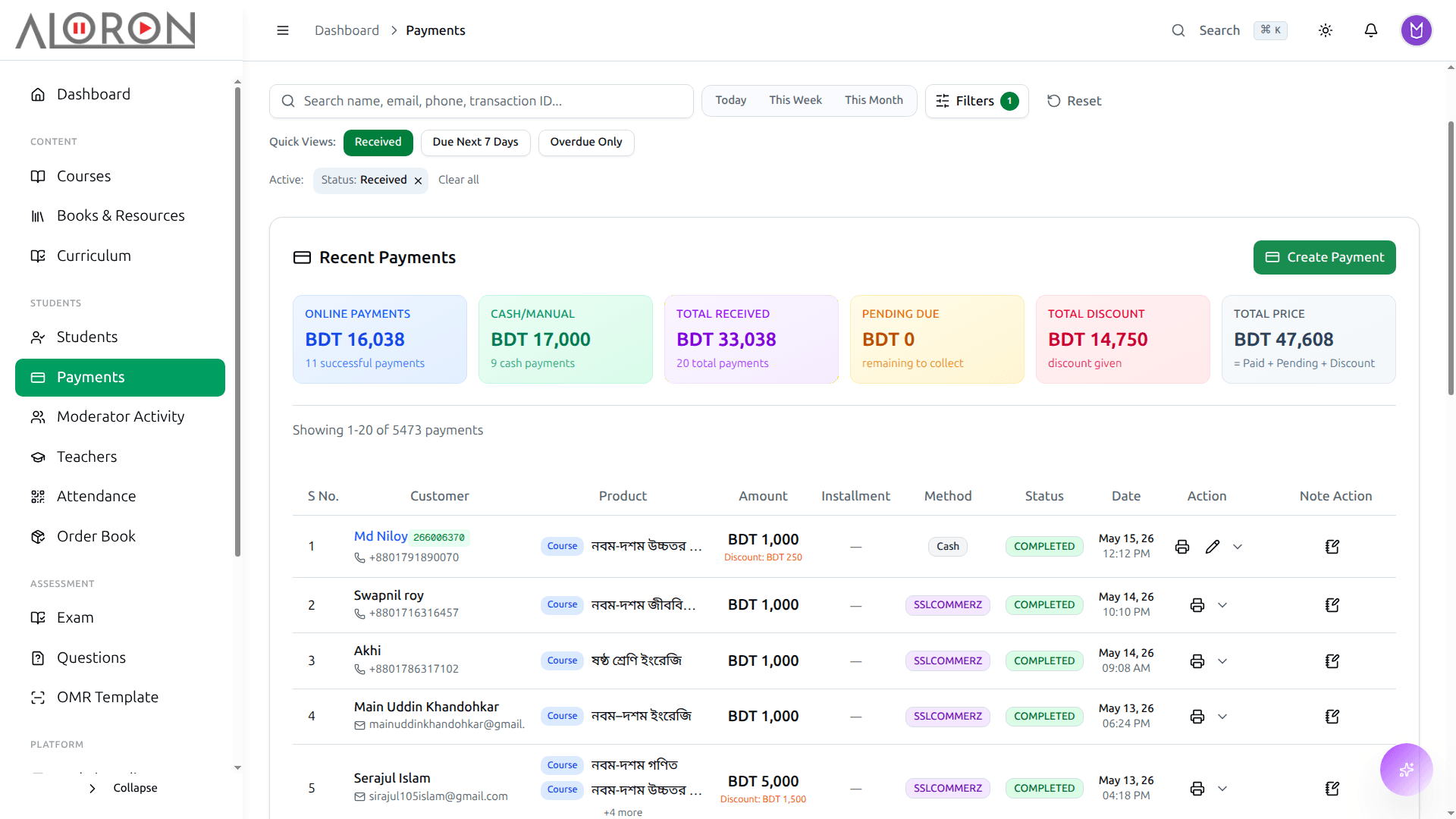
প্রতিটি পেমেন্টের অবস্থা, গেটওয়ে আর ব্যাচ, সাথে ডেস্কে হাতে নেওয়া নগদ টাকা বসানোর ব্যবস্থা। খাতাটা নিজে থেকেই মিলে যায়।
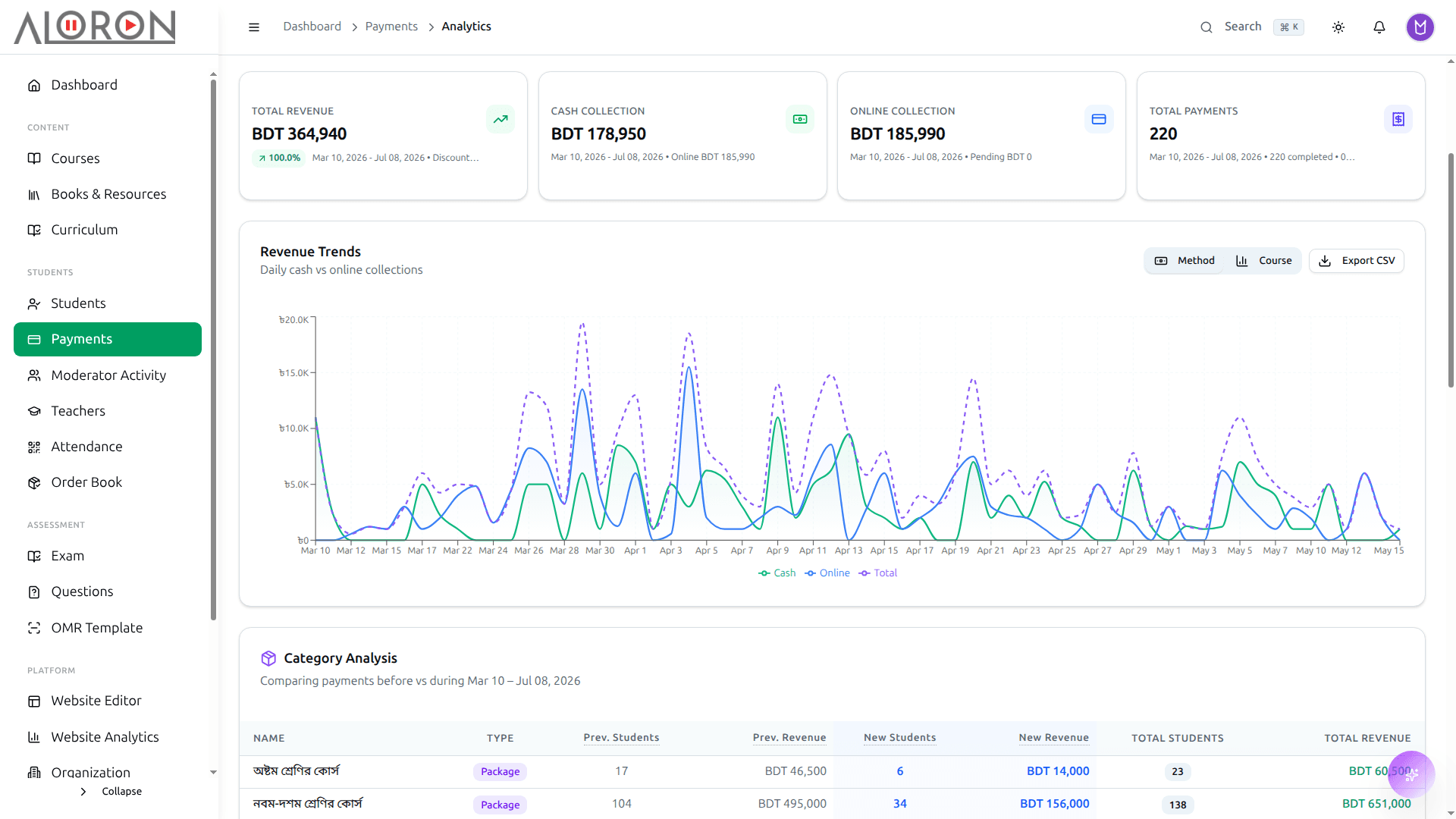
মাসের আদায়, বকেয়া কত, আর কোন ব্যাচ আসলে কেমন টাকা দিচ্ছে। ফুটোটা ধরা পড়ে দ্বিতীয় মাসেই, বছর শেষে নয়।
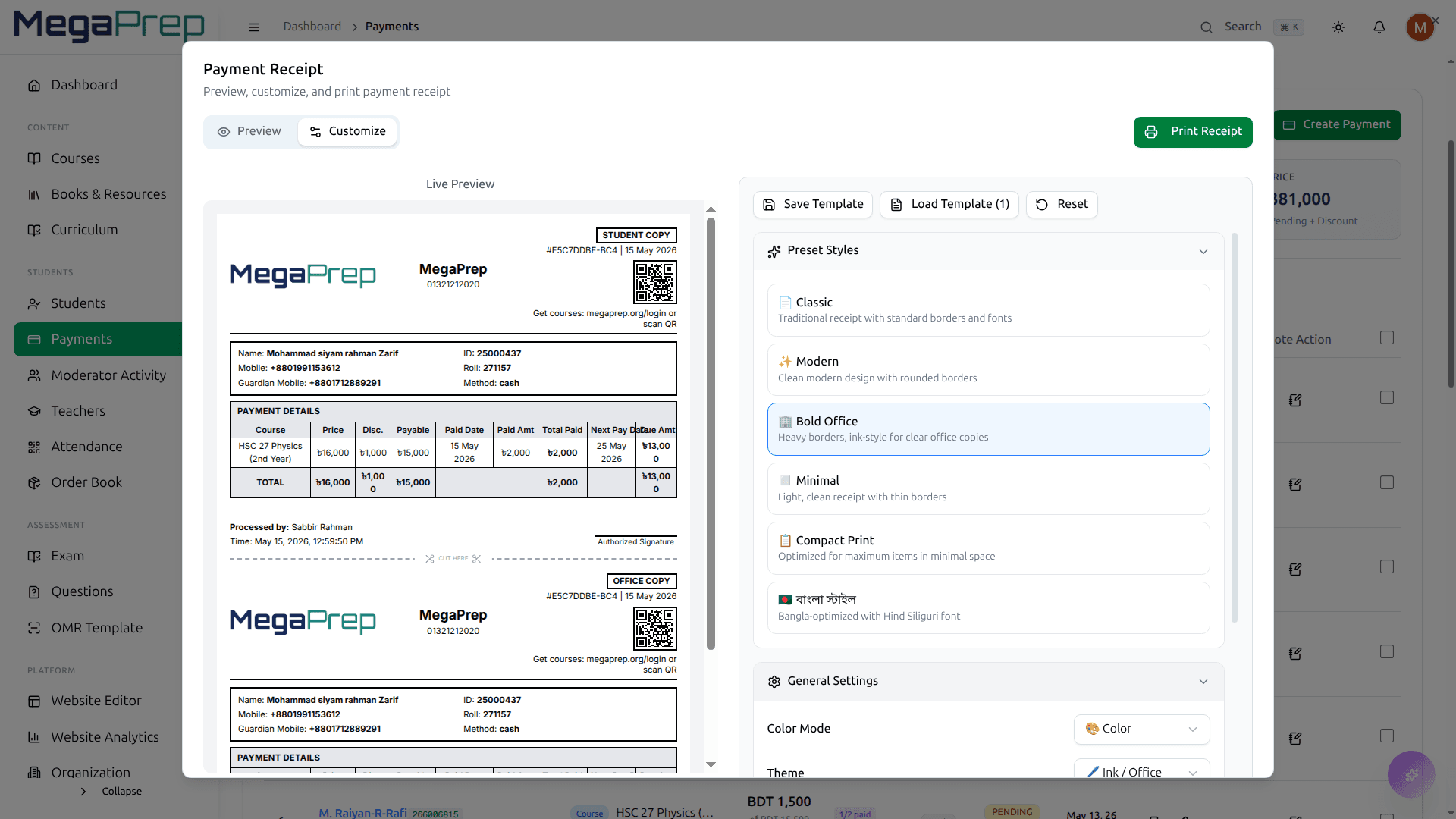
টাকা জমা হওয়ার সাথে সাথেই আপনার প্রতিষ্ঠানের নামে রসিদ তৈরি হয়ে ইমেইলে চলে যায়। রসিদ চেয়ে কেউ আর মেসেজ দেয় না।
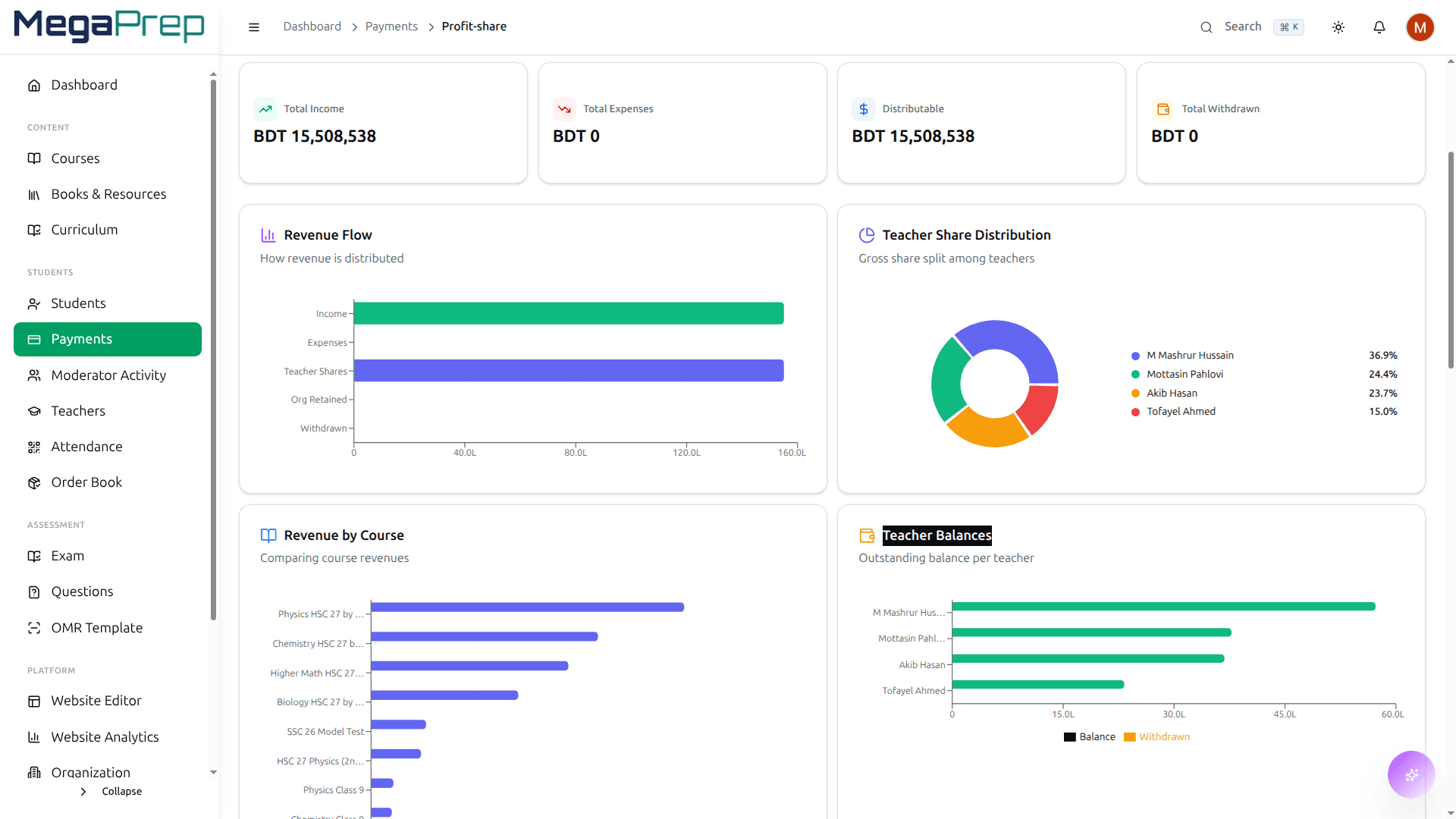
প্রতিটি শিক্ষকের ভাগটা একবার বসিয়ে দিন। Course37 হিসাব কষে দেখিয়ে দেয় কে কত টাকা এনেছেন আর কে কত পেলেন।
কোন বিজ্ঞাপনে টাকা দেওয়া ছাত্রটা এলো
বুস্ট আর ব্যানারের পেছনে টাকা যাচ্ছে, অথচ কোনটা ব্যাচ ভরাল সেটা বলতে পারেন না। ভিজিটর, সার্চে অবস্থান, ভর্তি আর পেমেন্ট এক পর্দাতেই, তাই যেটা কাজ করে না তার পেছনে টাকা ঢালা বন্ধ করতে পারবেন।
- ডেভেলপার ছাড়াই Google Analytics আর Tag Manager যুক্ত করুন
- অভিভাবকেরা যে পেজগুলো খুঁজে পান, Search Console-এ তাদের অবস্থান
- ভিজিটর কোথা থেকে, কোন ডিভাইসে, কোন এলাকা থেকে
- ভর্তির ফানেল: টাকা দেওয়ার আগে কে কোথায় গিয়ে থেমে যায়
- গেটওয়ে আর কোর্স ধরে আয় কোন দিকে যাচ্ছে
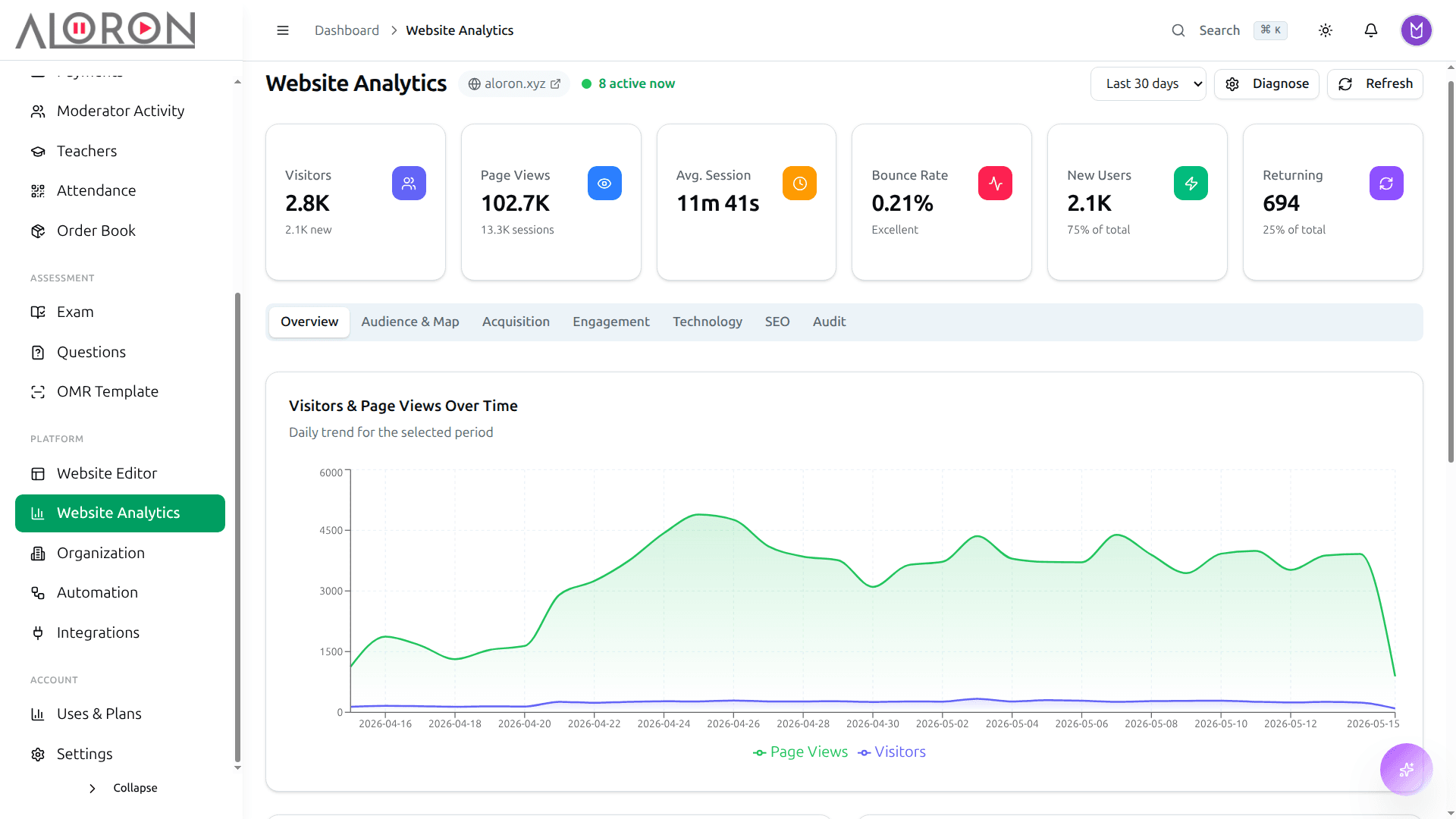
আপনার সাইটে কত পেজ ভিউ, কতজন ভিজিটর, কে কতক্ষণ থাকল, কোথা থেকে এলো আর কতজন ভর্তি হলো। শিক্ষার্থীরা আসলে কোথা থেকে আসে, দেখে নিন।
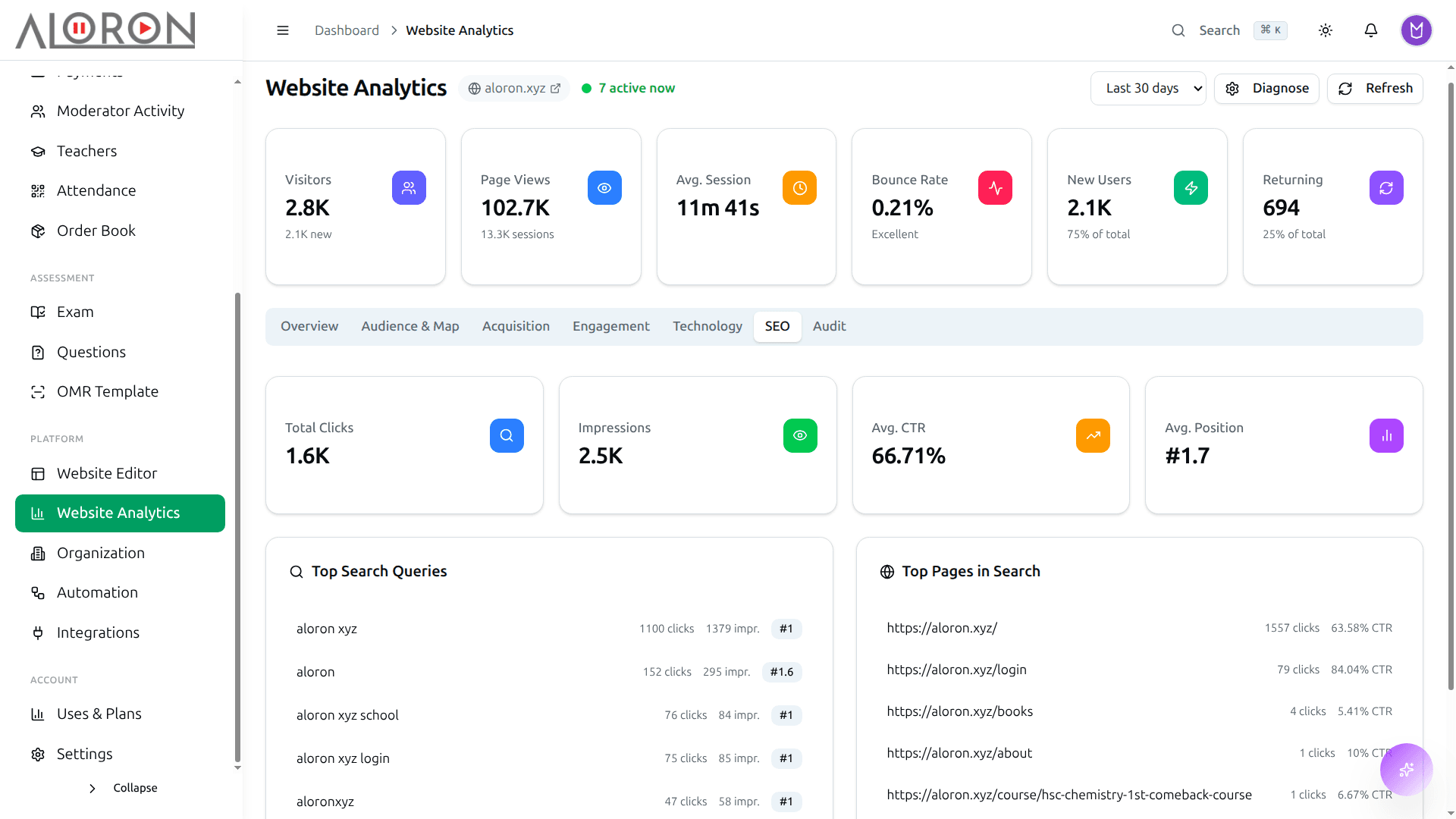
Search Console থেকে কিওয়ার্ড, ইম্প্রেশন, ক্লিক আর ইনডেক্সিংয়ের হিসাব। কোন সার্চে অভিভাবকের চোখের সামনে আপনি পড়েন, জেনে নিন।
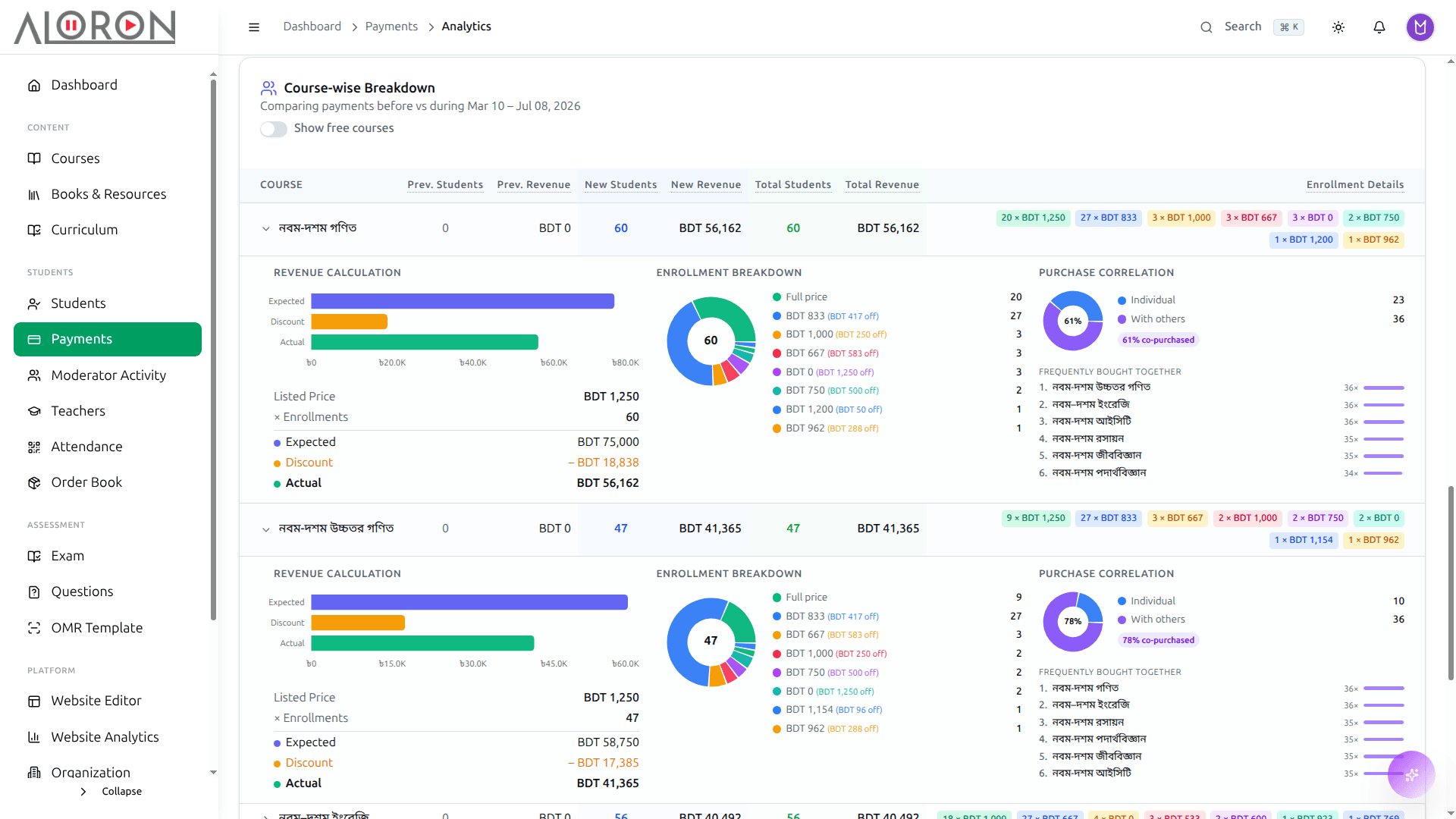
কোথায় এসে মানুষ ভর্তি হয়, আর কোথায় এসে টাকা না দিয়েই থেমে যায়। কোথায় ঝরে যাচ্ছে, সেই জায়গাটার ঠিকানা অবশেষে পাওয়া গেল।
যে রিমাইন্ডারগুলো পাঠাতে বারবার ভুলে যান
ফির তাগাদা যায় তখনই, যখন কারও মনে পড়ে। ক্লাসের রিমাইন্ডার তো যায়ই না। ফ্লোটা একবার বানিয়ে রাখুন, ডেস্কে কেউ থাকুক বা না থাকুক, সেটা নিজে থেকেই চলবে।
- বকেয়া ফির তাগাদা এসএমএস আর ইমেইলে, আপনাকে ছাড়াই
- জন্মদিনের শুভেচ্ছা ঠিক দিনটাতেই, প্রতি বছর
- ক্লাসের আগেই রিমাইন্ডার, হাজিরা নিয়ে পরে আফসোস করতে হয় না
- শিক্ষার্থী ভর্তি হওয়ার মুহূর্তেই ভর্তি নিশ্চিতকরণ আর শুরুর নির্দেশনা
- বারবার করতে হয় এমন বাকি যেকোনো কাজের জন্য নিজের মতো ট্রিগার আর অ্যাকশন
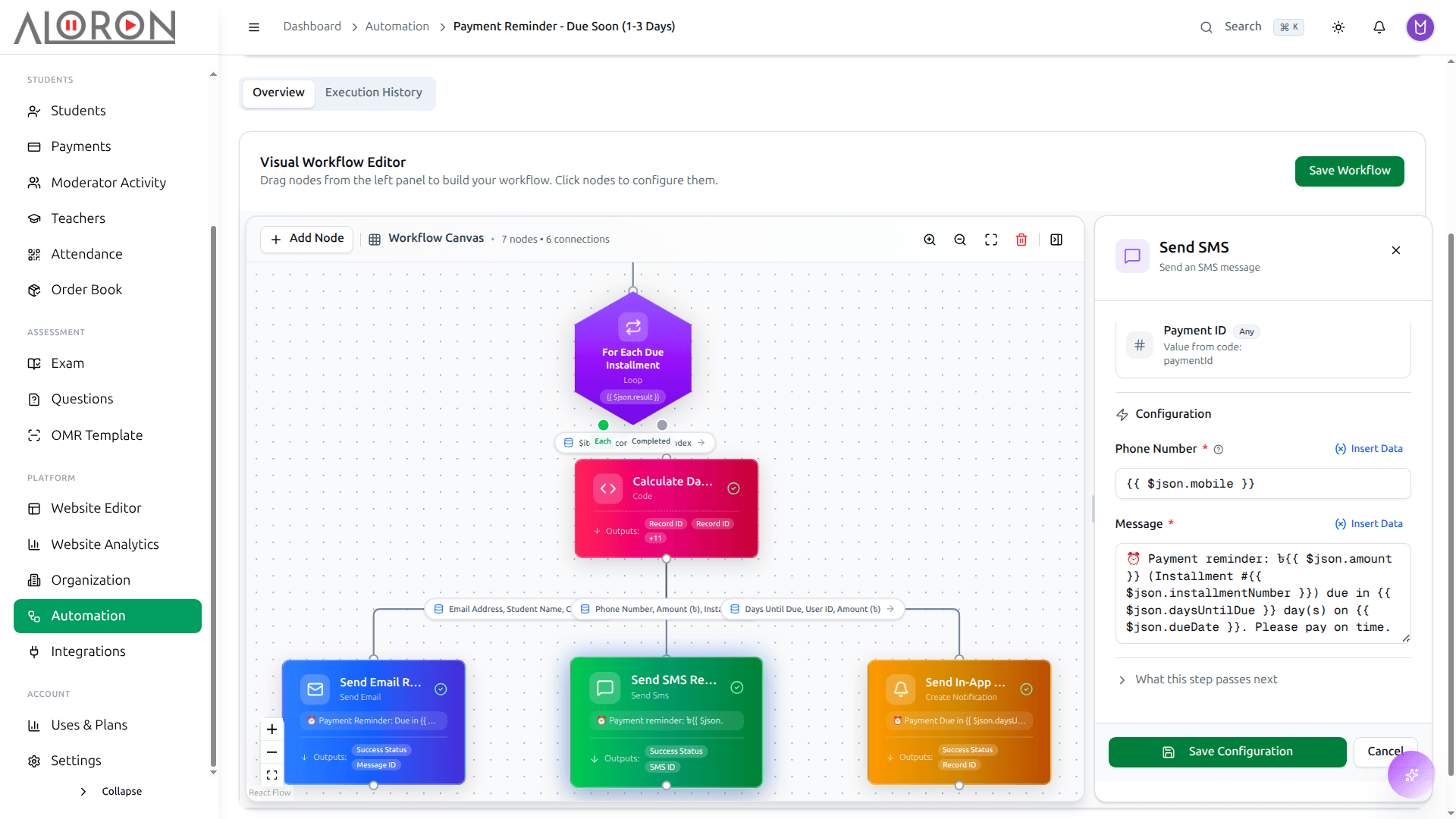
ট্রিগার, শর্ত আর অ্যাকশন টেনে এনে ফ্লো বানান। রাত ১২টায় ফি বকেয়া হলো, সকালের মধ্যেই তাগাদা চলে গেল।
যে টুলগুলোর পেছনে আপনি টাকা দিচ্ছেন, তাদের সাথেই কথা বলে
যে পেমেন্ট গেটওয়ে, এসএমএস সেবা আর মিটিং টুল এতদিন ব্যবহার করে আসছেন, সেগুলো কেউ ছেড়ে দিতে চায় না। এক স্ক্রিন থেকেই যুক্ত করুন: API কি বসান, টেস্ট করুন, চালু করে দিন।
- পেমেন্ট: SSLCommerz (bKash, Nagad, Rocket, কার্ড), Stripe
- যোগাযোগ: Email SMTP, BulkSMS, Firebase FCM
- এআই: Anthropic Claude, OpenAI, Google Gemini, Groq
- অ্যানালিটিকস: Google Analytics, GTM, Search Console, Meta Pixel
- লাইভ ক্লাস: Zoom, Google Meet
- কুরিয়ার: Steadfast, যে বইগুলো পাঠান তার জন্য
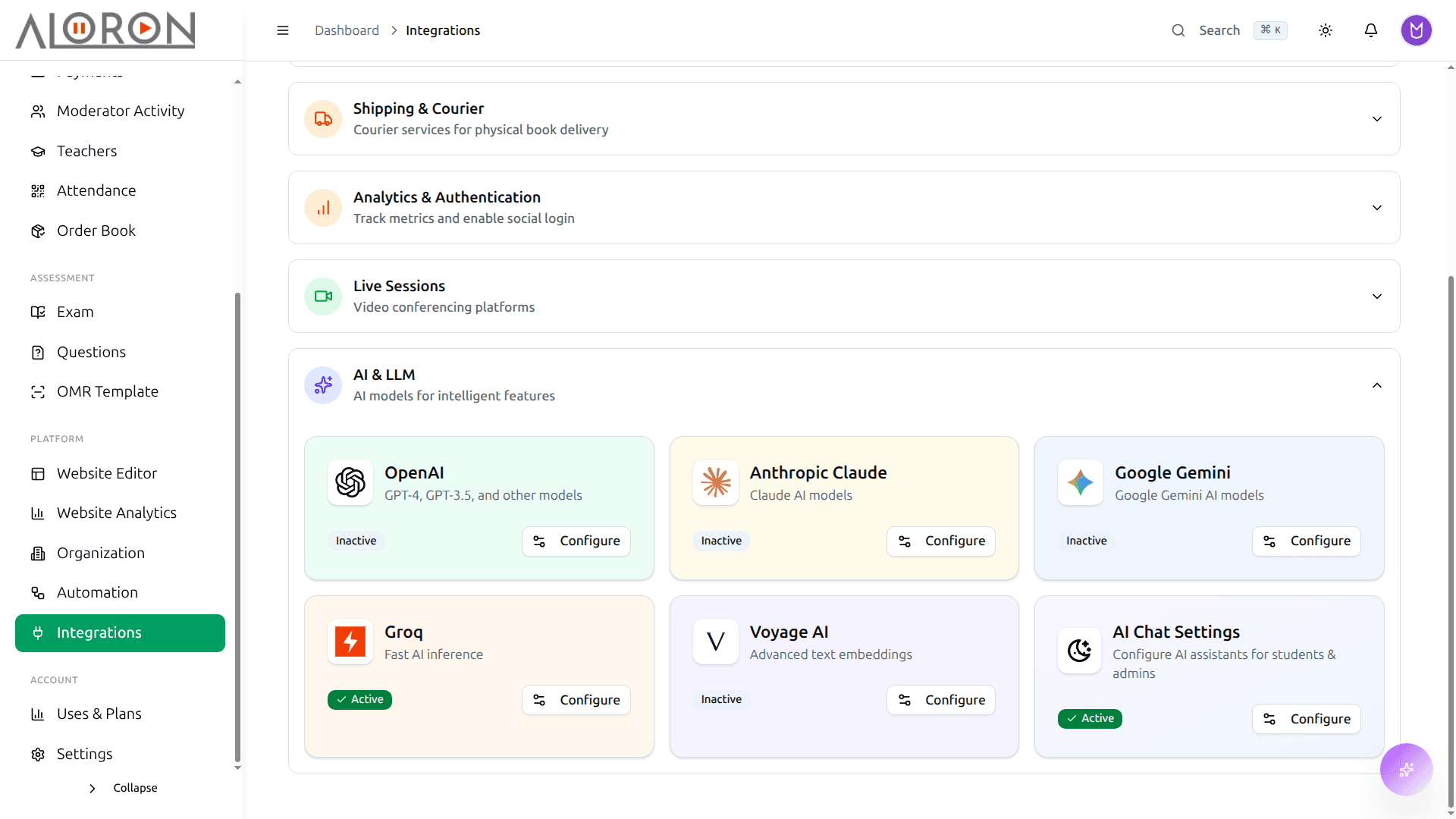
সব ইন্টিগ্রেশন এক তালিকায়, সাথে তার তথ্য আর একটা টেস্ট বোতাম। শিক্ষার্থী হাত দেওয়ার আগেই জেনে যাবেন কানেকশনটা কাজ করছে কি না।
সামনের সপ্তাহের প্রশ্ন ফ্রন্ট ডেস্কের দেখার কথা নয়
সবাই মালিকের লগইন দিয়েই কাজ চালায়, কারণ আলাদা লগইন বানানোর ঝামেলাটা কেউ কখনও নেয়নি। প্রত্যেককে এমন একটা রোল দিন, যেটা তার কাজের বাইরে কিছুতে হাত দিতে দেয় না, আর কে কী করল তার রেকর্ডও থাকুক।
- আগে থেকেই তৈরি রোল: অ্যাডমিন, শিক্ষক, মডারেটর, সাপোর্ট
- অনুমতিগুলো নিজের মতো মিলিয়ে নতুন রোল বানান
- মডিউল ধরে অ্যাকসেস: কোর্স, পেমেন্ট, পরীক্ষা, শিক্ষার্থী
- ব্রাঞ্চ ধরে অ্যাকসেস, ব্রাঞ্চ ম্যানেজার শুধু নিজের ব্রাঞ্চটাই দেখেন
- মডারেটরের কালেকশন হিসাব: কোন টাকা কে তুলেছে, প্রতিটির পাশে নাম
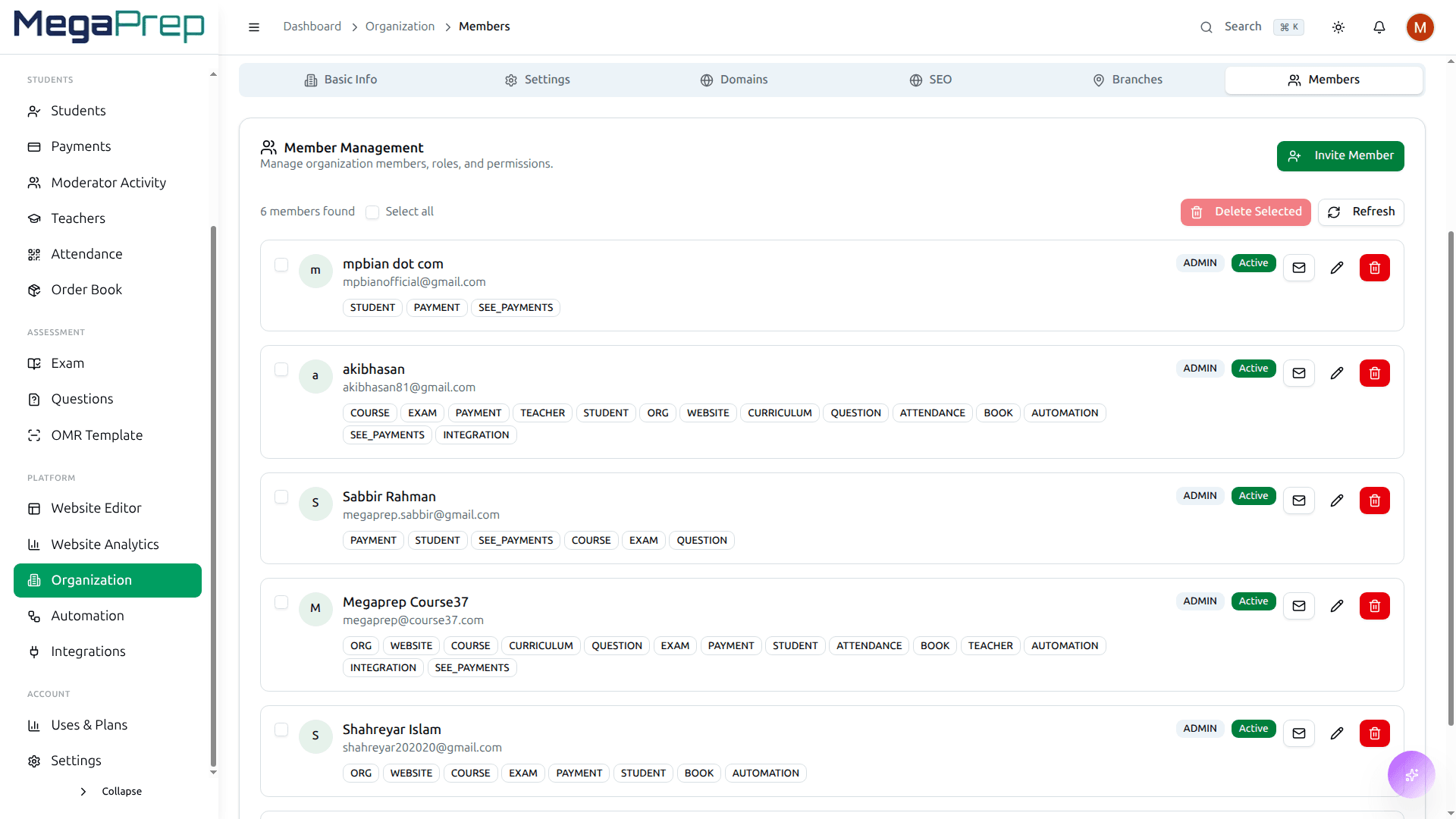
মডিউল আর কাজের অনুমতি বেছে নিয়ে একটা রোল বানান, তারপর সেটা দিয়ে দিন। ডেস্ক পেমেন্ট বসাবে, প্রশ্ন ব্যাংক কখনও খুলবে না।
অফিসের কাজটা নিজের এআই এজেন্টকে দিয়ে দিন
MCP চলে এমন যেকোনো এজেন্ট যুক্ত করুন, একজন অ্যাডমিন যা করেন সে তাই করবে: পেমেন্ট বসানো, ক্লাস শিডিউল করা, মেধা তালিকা বের করা। সে OAuth2 দিয়ে লগইন করে, আর আপনি যতটুকু অনুমতি দেন ঠিক ততটুকুতেই হাত দিতে পারে।
- মডিউলে ভিডিও যোগ করা, লাইভ ক্লাস শিডিউল করা, কোর্স এডিট করা
- পেমেন্ট বসানো, কিস্তি যোগ করা, কার ফি এখনও বাকি জিজ্ঞেস করা
- পরীক্ষা, রেজাল্ট, মেধা তালিকা আর প্রশ্ন ব্যাংক ঘেঁটে দেখা
- লভ্যাংশ: কার কত ভাগ, খরচ, উত্তোলন আর হিসাব
- চাইলেই শিক্ষার্থীর রিপোর্ট আর ওয়েবসাইটের ভিজিট রিপোর্ট
- OAuth2 ক্লায়েন্ট-ক্রেডেনশিয়াল: এজেন্টের কাছে কোনো পাসওয়ার্ড থাকে না
- প্রতিটি টুল খোলে শুধু সেই স্কোপে, যেটা আপনি নিজে হাতে দিয়েছেন
- শুধু আপনার প্রতিষ্ঠানের ভেতরে, আর মত বদলালেই সাথে সাথে বাতিল
Model Context Protocol
POST /mcp
আপনার নিজের কোচিংয়ে দেখে নিন
ব্যাচ, ফি আর পরীক্ষা আজ আপনি কীভাবে সামলান, সেটা আমাদের বলুন। Course37-এর কোন অংশটা সেটার জায়গা নেবে আর কোন অংশটা আপনার লাগবেই না, দুটোই দেখিয়ে দেব।