How to Create an Organization
Learn about organization setup during the Course37 signup process
How to Create an Organization
Organization creation is part of the signup process in Course37. When you sign up for an account, you'll create your organization on the same page.
👉 See How to Sign Up as an Admin for the complete step-by-step guide.
Quick Overview
The signup page has two sections:
1. Create Your Account
- Sign up with Email & Password, OR
- Sign in with Google
2. Create Your Organization
- Enter your Organization Name
- Set your Website URL (subdomain slug)
- Select your Organization Type
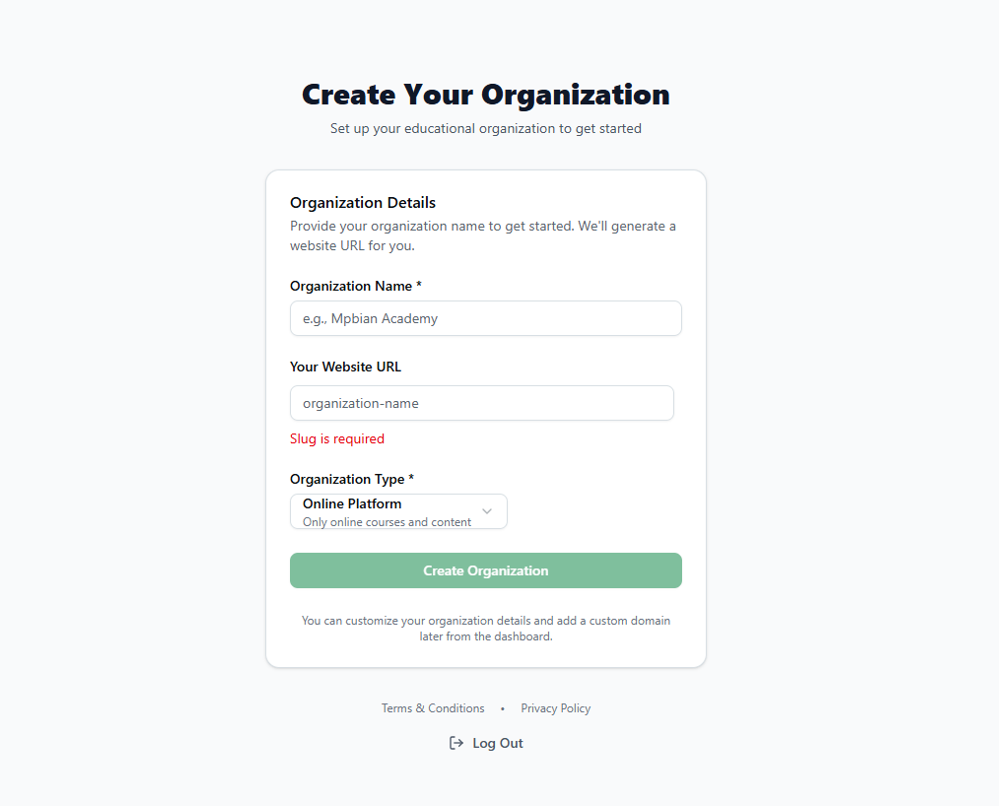
Organization Fields
| Field | Description |
|---|---|
| Organization Name | Your institution name (e.g., "Mpbian Academy") |
| Your Website URL | Unique slug that creates your subdomain (e.g., mpbian → mpbian.course37.com) |
| Organization Type | Online Platform, Coaching Center, School/College, or Training Company |
Organization Types Explained
- Online Platform — Purely online courses and content delivery
- Coaching Center — Offline or hybrid coaching institutes
- School/College — Formal educational institutions
- Training Company — Corporate training and professional development
After Creating Your Organization
Once you click Create Organization, you'll be redirected to your Admin Dashboard.
Recommended next steps:
- Add Organization Details — Logo, contact info, branding
- Set Timezone & Region — Configure location settings
- Invite Team Members — Add teachers and staff
organizationcreatesetupsignuponboarding
More in Getting Started
How to Sign Up as an Admin in Course37
Create your Course37 account and set up your educational organization to get started
How to Login
Access your Course37 admin dashboard with email/mobile and password or Google sign-in
How to Reset Password
Reset your Course37 password using email or mobile OTP verification
Organization Management
Configure your organization's basic info, domains, SEO, settings, branches, members, and view analytics